
Description:
The WAN tag table can be used to restrict VPN dial-ins to a specific local network without having to create firewall rules. This does, however, require different interface tags to be specified for the networks. It is even possible for the networks to have the same IP address range.
Communication between networks with different interface tags is initially not possible. Implementing this requires the tags to be changed by means of a firewall rule. For this reason the scenario only makes sense if no communication is required between the networks.
Requirements:
- LCOS as of version 9.24 (download latest version)
- LANtools as of version 9.24 (download latest version)
- Functional networks and VPN dial-ins
Scenario:
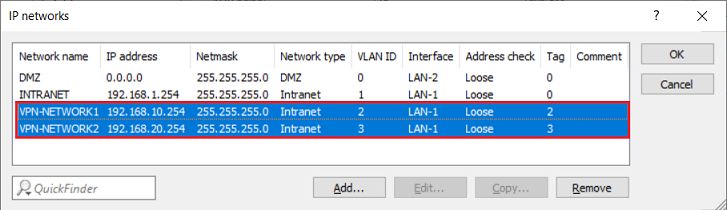
- Currently in use are the networks VPN-NETWORK1 (Interface tag 2) and VPN-NETWORK2 (Interface tag 3).
- The VPN connection VPN-DIAL-IN1 should access the VPN-NETWORK1 and VPN-DIAL-IN2 should access the network VPN-NETWORK2.
Procedure:
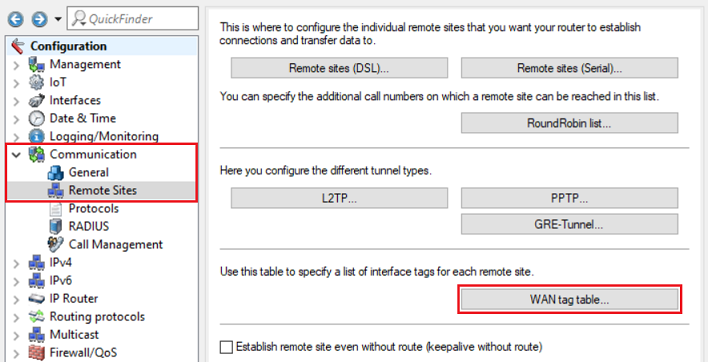
1) Open the configuration for the router in LANconfig and switch to the menu item Communication → Remote Sites → WAN tag table.
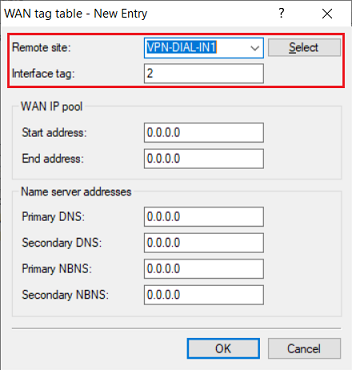
2) Add a new entry for the first network (VPN-NETWORK1) and adjust the following parameters:
- Remote site: From the drop-down menu, select the VPN remote site that should access the first network (in this case VPN-DIAL-IN1).
- Interface tag: Enter the interface tag of the first network (in this case, tag 2).
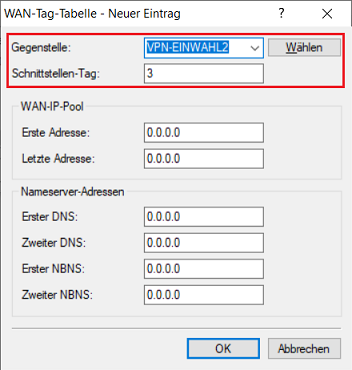
3) Add a new entry for the second network (VPN-NETWORK2) and adjust the following parameters:
- Remote site: From the drop-down menu, select the VPN remote site that should access the second network (in this case VPN-DIAL-IN2).
- Interface tag: Enter the interface tag of the second network (in this case, tag 3).
4) This concludes the configuration of the WAN tag table. Write the configuration back to the router.
