
Description:
This document describes how to create a cron job in the cron table of a router or access point operated with LCOS, which regularly performs a warm start of an LCOS LX access point on the local network.
This can be useful because cron jobs cannot be configured on the LCOS LX itself.
Requirements:
- LCOS as of version 10.72 RU4 on the LCOS router or access point (download latest version)
Procedure:
1. Open the configuration of the LCOS-based LANCOM router or access point.
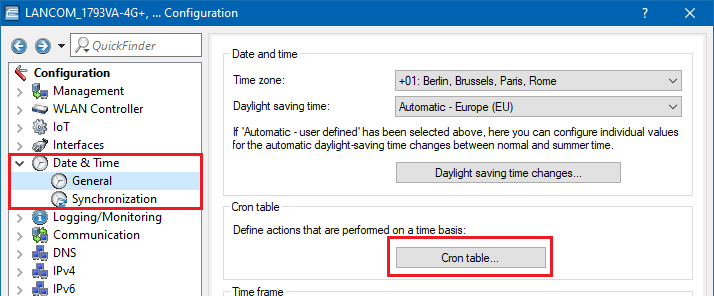
2. Go to the menu Date & Time → Cron table and add a new entry.
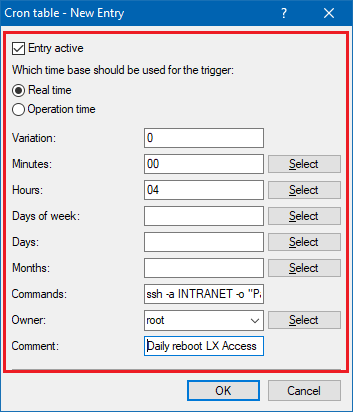
3. Configure the necessary date and time parameters and enter the following into the Commands field:
ssh -a INTRANET -o "Password=<Password of the LX-AP>" -o "StrictHostKeyChecking=no" root@<IP address of the LX-AP> do /other/reboot
The parameter sleep 3000 is necessary because otherwise the SSH connection would be terminated right after it has been established, without triggering the reboot. Thus, the sleep parameter ensures, that the reboot can be executed during the wait time of three seconds.
Example:
An access point operated with LCOS LX with the local IP address 192.168.66.101 should perform a warm start every day at 4 AM. The command is as follows:
ssh -a INTRANET -o "Password=12345678" -o "StrictHostKeyChecking=no" root@192.168.66.101 do /other/reboot; sleep 3000
