Description:
This article describes how the encryption algorithms in an SSH client can be restricted to AES-GCM and AES-CTR.
When using SSH, the SSH server and the SSH client transmit the supported encryption algorithms to each other. As the SSH server always selects the first algorithm from the list of the SSH client the server also supports, it is sufficient to restrict the preferred algorithms in the client.
Requirement:
- SSH client (e.g. PuTTY)
Procedure:
General procedure:
The encryption algorithms AES-GCM and AES-CTR have to be used as preferred algorithms in the SSH client. Also hash algorithms with Encrypt-then-MAC (EtM) have to be deactivated, if possible.
Procedure for the SSH client PuTTY:
In PuTTY there are no options to configure hash algorithms. It is therefore sufficient to modify the encryption algorithms.
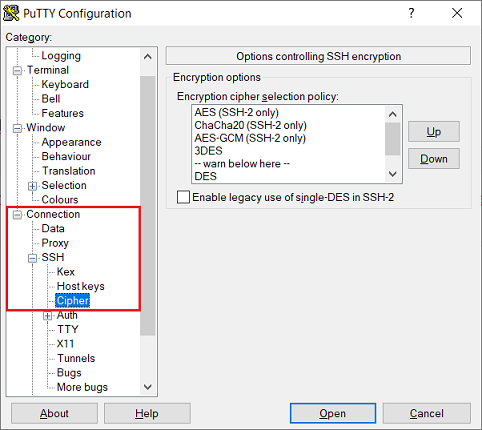
1) Open PuTTY and navigate to the menu Connection → SSH → Cipher.
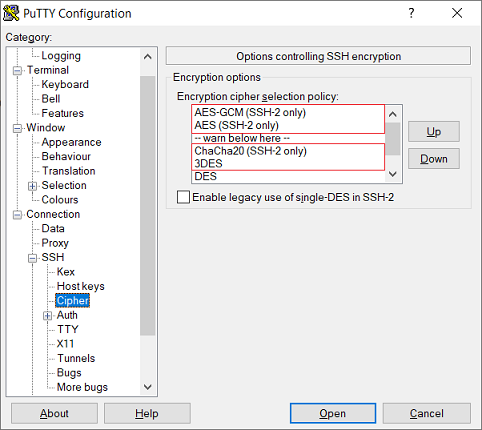
2) Move the following algorithms as follows via Drag & Drop or via the Up and Down buttons:
- AES-GCM has to be moved to the top.
- AES has to be moved to the second position.
- ChaCha20 has to be moved below "warn below here".
- 3DES has to be moved below "warn below here".
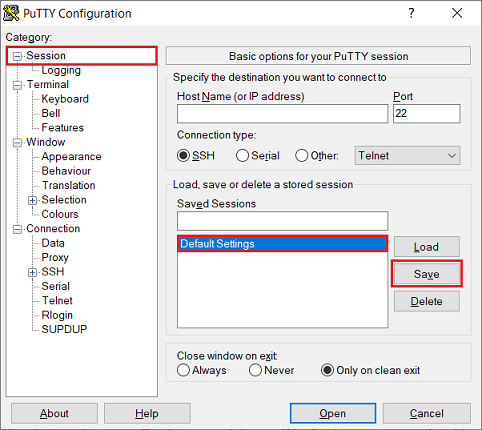
3) Navigate to the menu Session, and, under Saved Sessions select the Default Settings and click Save.
The Default Settings are loaded automatically when starting PuTTY.