Description:
This article describes how a stacking group of XS or GS-45xx switches can be integrated in the LANCOM Management Cloud.
Requirements:
- LMC Zugang (kostenpflichtig) mit vorhandenem LMC-Projekt und Lizenzen für alle eingesetzten LANCOM Geräte
- LANtools ab Version 10.50 (download aktuelle Version)
- LCOS SX ab Version 5.20 Rel (download aktuelle Version)
- Die Switches dürfen noch nicht mit der LMC verbunden sein
- Beliebiger Web-Browser für den Zugriff auf die LANCOM Management Cloud
Procedure:
1) Configuring the stacking group:
As of April 2022 a stacking group cannot be configured via the LMC. Thefore the stack has to be configured manually via the webinterface of the devices.
At this time the switches must not be connected to the LMC, as configuration changes made via the webinterface are not taken over into the LMC. Should the switches already be connected to the LMC, please remove them from the LMC first.
The procedure to configure stacking is described in the following Knowledge Base article:
LANCOM switches: Configuring stacking on XS and GS-45xx series switches
2) Pairing process with the LANCOM Management Cloud:
Initiate the Pairing process as described in the following Knowledge Base article. In doing so, it should be noted, that pairing has to be done for each switch individually and a separate LMC licence is needed for each device.
3. Konfigurationsmöglichkeiten des Stacking-Verbunds in der LANCOM Management Cloud:
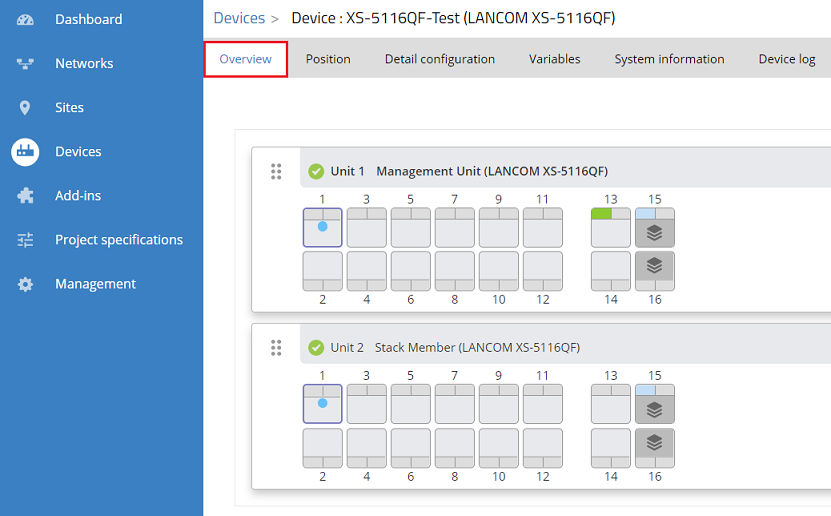
3.1) Connect to the LMC, and in the menu Devices click on the stacking group under Name. It is easily recognizeable as a "Layer" symbol with the device count is shown under Model.
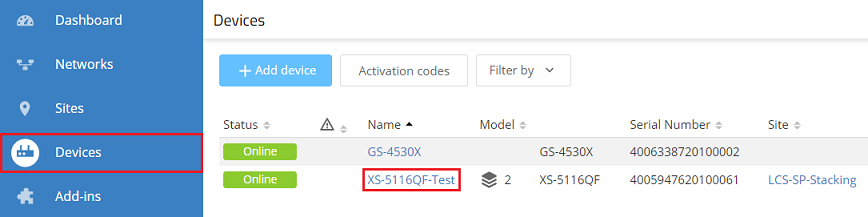
3.2) In the Overview the switch ports can be configured for each unit (with the exception of the stacking ports).