Description:
Standard-compliant Wi-Fi 7 certified operation according to the specifications of the Wi-Fi Alliance requires specific encryption parameters. This means, that different encryption profiles are required for Wi-Fi 6 and Wi-Fi 7 clients. As of LCOS LX 7.10 Rel there is a separate encryption profile for Wi-Fi 7, so that it can be selected directly in an SSID.
However, the encryption profile for Wi-Fi 7 in Wi-Fi 7 access points with LCOS LX as of version 7.10 Rel is only present in access points in the factory state. In existing installations the encryption profile has to be created manually.
This article describes, which parameters have to be selected for the Wi-Fi 7 encryption profile.
A separate encryption profile for Wi-Fi 7 can currently only be created on a standalone access point via LANconfig. This is not possible via WEBconfig.
It is currently also not possible to create a separate encryption profile for Wi-Fi 7 in a WLAN-Controller or in the LMC and assign it to an access point.
Using the LMC, the encryption profile for Wi-Fi 7 can only be created via an Add-in and assigned to a new or existing SSID. You can find the Add-in on the following page in the Add-in manual:
Requirements:
- Access point with Wi-Fi 7 support (e.g. LX-7300 and LX-7500)
- LCOS LX as of version 7.10 Rel (download latest version)
- LANtools as of version 10.92 (download latest version)
Procedure:
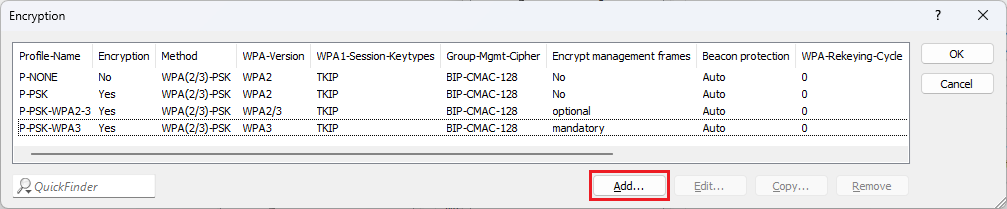
1) Open the configuration of the access point in LANconfig and go to the menu Wireless-LAN → WLAN-Netzwerke → Verschlüsselung.
2. Klicken Sie auf Hinzufügen, um ein neues Verschlüsselungs-Profil zu erstellen.
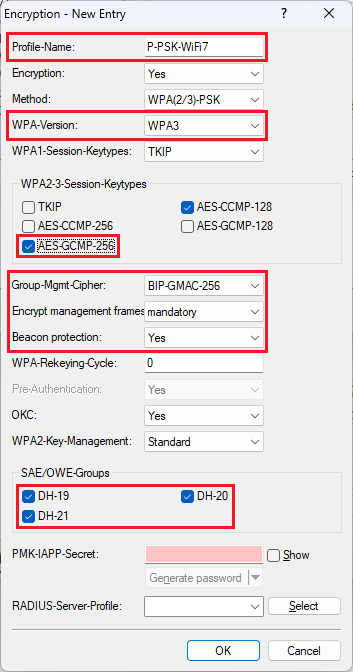
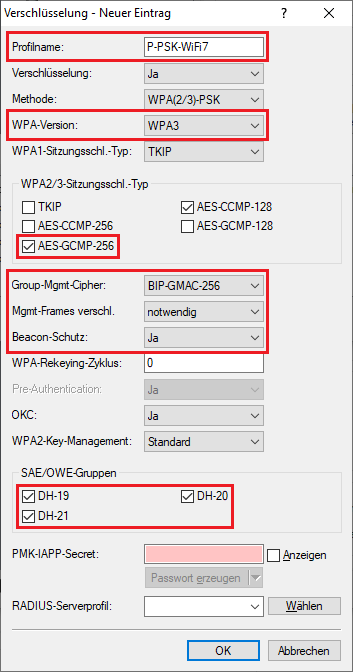
3. Passen Sie die folgenden Parameter an:
- Profilname: Vergeben Sie einen aussagekräftigen Namen für das Verschlüsselungs-Profil (in diesem Beispiel P-PSK-WiFi7).
- WPA-Version: Wählen Sie im Dropdown-Menü die Option WPA3 aus. WPA2 wird nicht unterstützt.
- WPA2/3-Sitzungsschlüssel-Typ: Aktivieren Sie den Typ AES-GCMP-256.
- Group-Mgmt-Cipher: Wählen Sie im Dropdown-Menü die Option BIP-GMAC-256 aus.
- Mgmt-Frames verschl.: Wählen Sie im Dropdown-Menü die Option notwendig aus.
- Beacon-Schutz: Wählen Sie im Dropdown-Menü die Option Ja aus.
- SAE/OWE-Gruppen: Aktivieren Sie die Gruppen DH-19, DH-20 und DH-21.
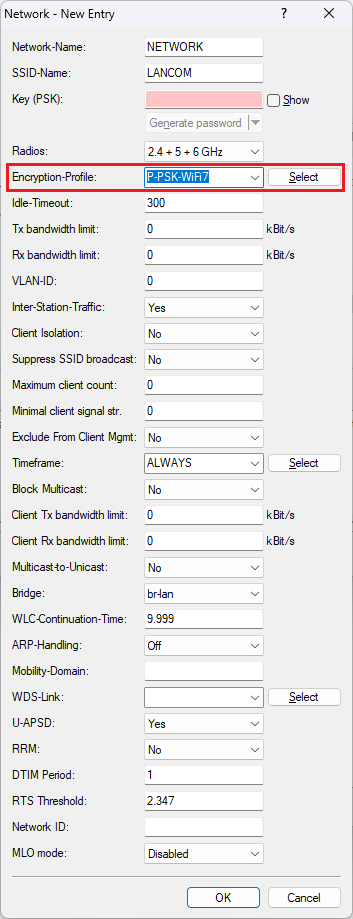
Das Verschlüsselungs-Profil kann anschließend in einem WLAN-Netzwerk ausgewählt werden (in dem Menü Wireless-LAN → WLAN-Netzwerke → Netzwerke).