
Description:
This article describes the icons which can be displayed before a device entry in LANconfig.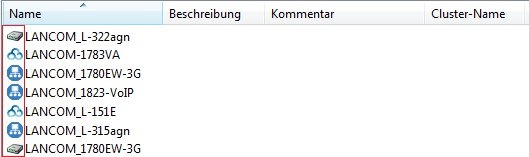
Requiremants:
- LANtools as of version 9 (download)
| Icon | Bedeutung |
 | Unconfigured device which is in the delivery state and can be reached via a network or the serial interface. |
 | Configured device, which can be reached via a network or the serial interface. |
 | Checking the device by LANconfig has been successful. |
 | An error has occurred during the test of the device by LANconfig. |
 | Configured LANCOM Switch, which can be reached via a network or the serial interface. |
 | LANCOM access point or WLAN router, which is managed via a LANCOM WLAN controller. |
 | LANCOM device, which is linked to the LANCOM Management Cloud and can be managed via it. |
 | LANCOM device, which belongs to a WLC or VPN cluster. |
 | Unconfigured device, in which one write access is not allowed (read only) in one or more access types. |
 | Configured device, in which one write access is not allowed (read only) in one or more access types. |
 | LANCOM Common Criteria Device with configuration that is not CC-compliant. |
 | LANCOM Common Criteria device with CC-compliant configuration. |
 | LANCOM device, which can not be reached (neither via a network nor via the serial interface). |
