This document describes how to configure an Advanced Mesh VPN connection on LANCOM routers.
For information about LANCOM Advanced Mesh, see the LCOS Reference Manual. |

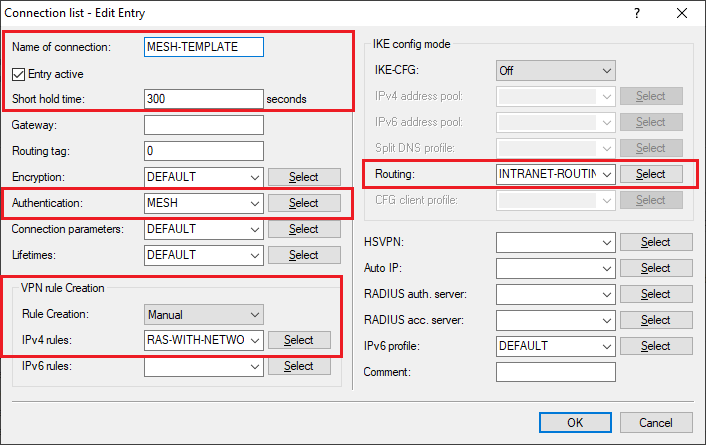
1.1 Create a new entry, e.g. “MESH-TEMPLATE”, in the IKEv2 connection list under VPN → IKEv2/IPsec → Connection list.
This entry serves as a template from which the dynamic mesh tunnels take their parameters. |
1.2 The Short hold time is the time of data inactivity after which Mesh-VPN tunnels disconnect, e.g. 300 seconds.
Deactivating the short hold time by setting it to the value 0 is not recommended, otherwise dynamic Mesh-VPN tunnels will never terminate after inactivity, and this will consume licenses. |
1.3 Leave the remote gateway blank as it is set dynamically.
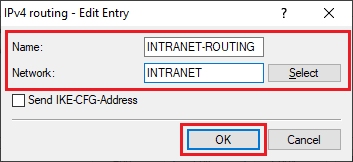
1.4 The Routing parameter transmits the local network to the opposite branch, in this case the network “INTRANET”.
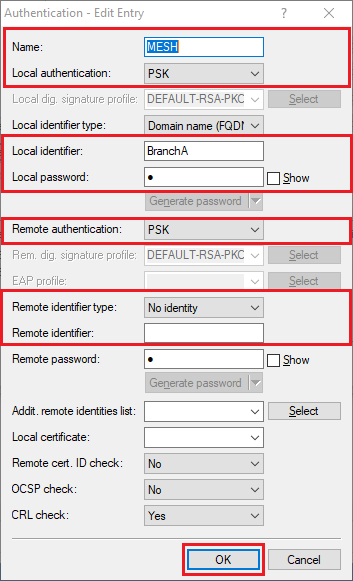
1.5 Go to the Authentication settings.
1.6 Set the VPN rule to “ANY” or set the IPv4 rules to “RAS-WITH-NETWORK-SELECTION”. Thus uses 0.0.0.0/0 <=> 0.0.0.0/0.
1.7 Set Rule creation to “Manual”.
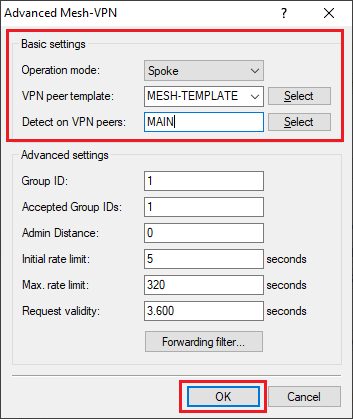
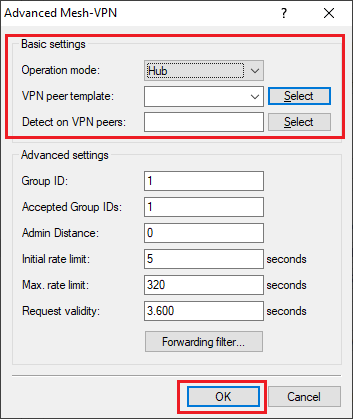
1.8 Now configure the Mesh-VPN parameters under VPN → IKEv2/IPsec → Extended settings → Advanced Mesh VPN.
1.9 Set the Operation mode to “Spoke“.
1.10 Under VPN peer template select the previously created IKEv2 peer as a template for the Mesh-VPN tunnel.
1.11 Under Detect on VPN peers, select the name of the VPN peer that corresponds to the name of the tunnel to the headquarters.
1.12 Write the configuration back to the router at branch office A.
2.1 The configuration is performed similar to branch A (see steps 1.1 to 1.11).
2.2 Change the Local identifier for the Authentication to the name of branch B.
3.1 Since the headquarters itself does not establish a dynamic mesh tunnel, there is no need to create a template for the peer.
3.2 Write the configuration back to the router at the headquarters.
If you now transfer data from branch A to branch B, the first packets take the detour via the headquarters.
After that, the dynamic mesh tunnel is set up between the branches.
A ping to the router’s IP address at the other end will not establish a mesh tunnel. A (possibly non-existent) station in the LAN at the other end must be used as the destination. |
|