This article describes, how IGMP packets can be routed via the IGMP proxy and Multicast packets can be routed via static Multicast routing.
The IGMP proxy and the static Multicast routing must not be used at the same time! |
Configuring the IGMP proxy:
The IGMP proxy must be used, if all members support IGMP and the IGMP packets should be routed between different networks (server and end devices are located in different networks).
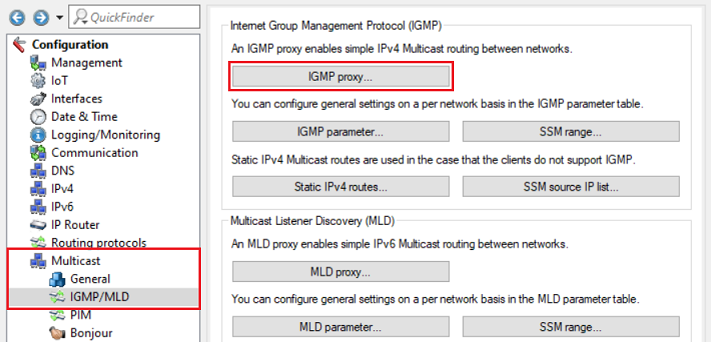
1) Open the configuration of the router in LANconfig and go to the menu Multicast → IGMP/MLD → IGMP proxy.
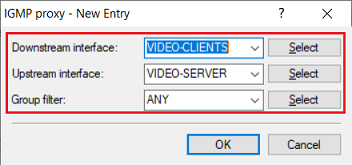
2) Modify the following parameters:
If you want to restrict the Multicast groups, you can create your own entries in the menus Multicast → General → IPv4 filter lists and Multicast → General → IPv6 filter lists. It is possible to create multiple entries with the same name, e.g. to allow one Multicast group and ban another one. The created filter list must then be selected in the field Group filter. |
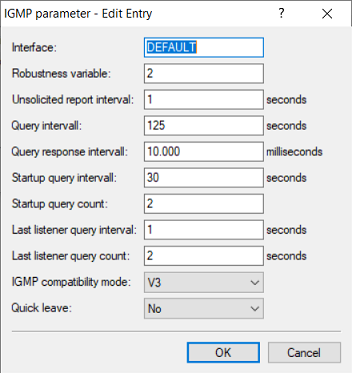
With default settings the IGMP proxy uses the IGMP parameters from the profile DEFAULT in the menu Multicast → IGMP/MLD → IGMP parameter for all interfaces, which don't have a specific entry. These values are also used, if the profile DEFAULT is deleted. You can also create your own parameter profile. However, this only makes sense, if the documentation of your streaming solution specifies different values. To do this, a separate entry with the same values must be created for each IPv4 network or each IPv4 remote site stored in the IGMP proxy. (e.g. one entry for the interface VIDEO-CLIENTS and another one for the interface VIDEO-SERVER).
|
3) This concludes the configuration steps for the IGMP proxy. Write the configuration back to the device.
Configuring static routing entries for Multicast packets:
Static Multicast routing must be used, if the members don't support IGMP (only "regular Multicast") and the Multicast packets should be routed between different networks (server and end devices are located in different networks).
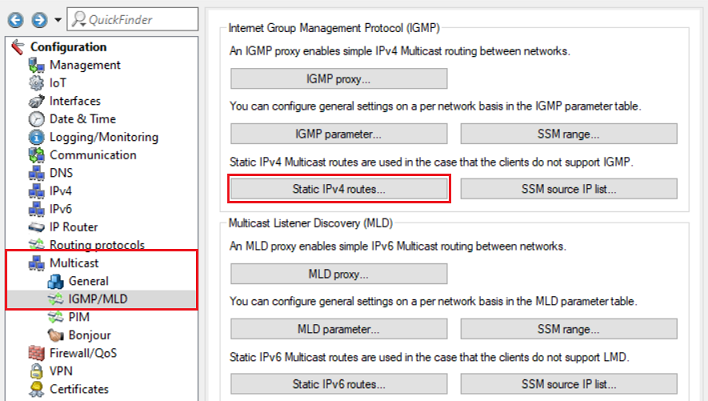
1) Open the configuration of the router in LANconfig and go to the menu Multicast → IGMP/MLD → Static IPv4 routes.
2) Modify the following parameters:
|
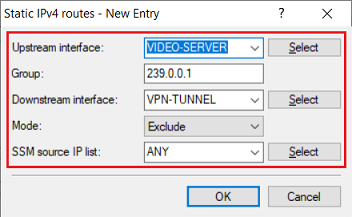
3) This concludes the configuration steps for the static Multicast routing. Write the configuration back to the device.
|