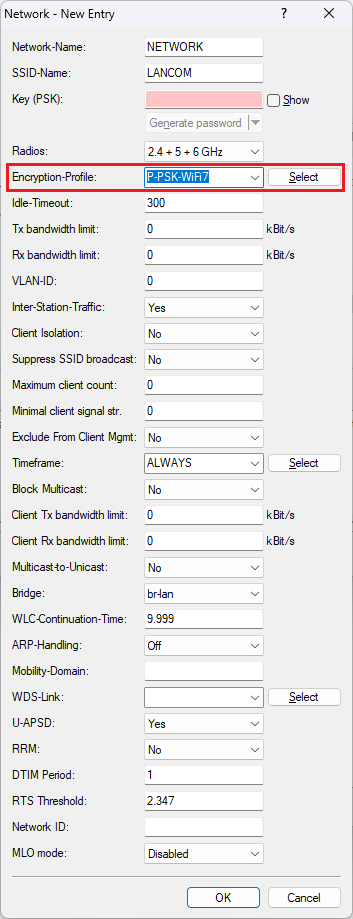
Standard-compliant Wi-Fi 7 certified operation according to the specifications of the Wi-Fi Alliance requires specific encryption parameters. This means, that different encryption profiles are required for Wi-Fi 6 and Wi-Fi 7 clients. As of LCOS LX 7.10 Rel there is a separate encryption profile for Wi-Fi 7, so that it can be selected directly in an SSID.
However, the encryption profile for Wi-Fi 7 in Wi-Fi 7 access points with LCOS LX as of version 7.10 Rel is only present in access points in the factory state. In existing installations the encryption profile has to be created manually.
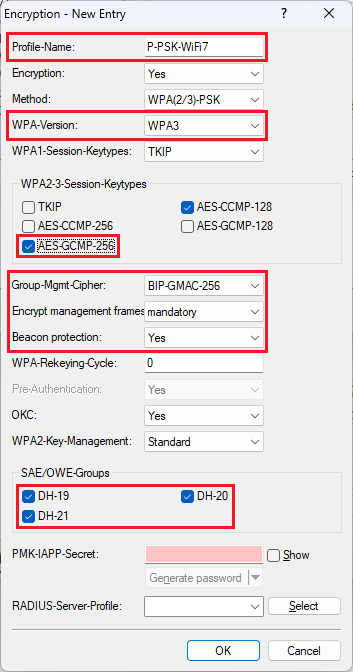
This article describes, which parameters have to be selected for the Wi-Fi 7 encryption profile.
A separate encryption profile for Wi-Fi 7 can currently only be created on a standalone access point via LANconfig. This is not possible via WEBconfig. It is currently also not possible to create a separate encryption profile for Wi-Fi 7 in a WLAN-Controller or in the LMC and assign it to an access point.
|
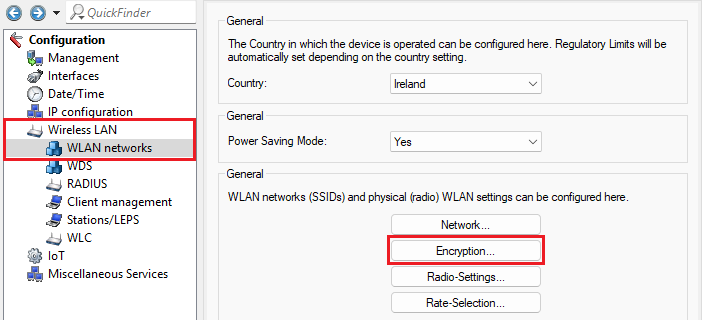
1) Open the configuration of the access point in LANconfig and go to the menu Wireless LAN → WLAN networks → Encryption.
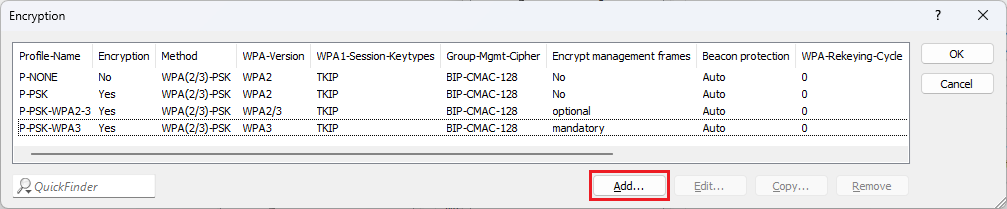
2) Click Add to create a new encryption profile.
3) Modify the following parameters:
Afterwards, the encryption profile can be selected in a WLAN network (in the menu Wireless LAN → WLAN networks → Network).
|
|