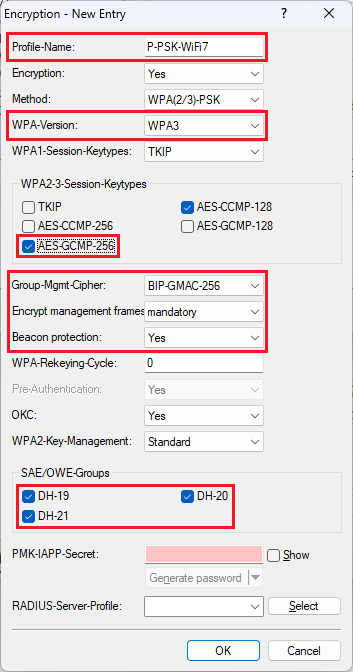
Standard-compliant Wi-Fi 7 certified operation according to the specifications of the Wi-Fi Alliance requires specific encryption parameters. This means, that different encryption profiles are required for Wi-Fi 6 and Wi-Fi 7 clients. As of LCOS LX 7.10 Rel there is a separate encryption profile for Wi-Fi 7, so that it can be selected directly in an SSID.
However, the encryption profile for Wi-Fi 7 in Wi-Fi 7 access points with LCOS LX as of version 7.10 Rel is only present in access points in the factory state. In existing installations the encryption profile has to be created manually.
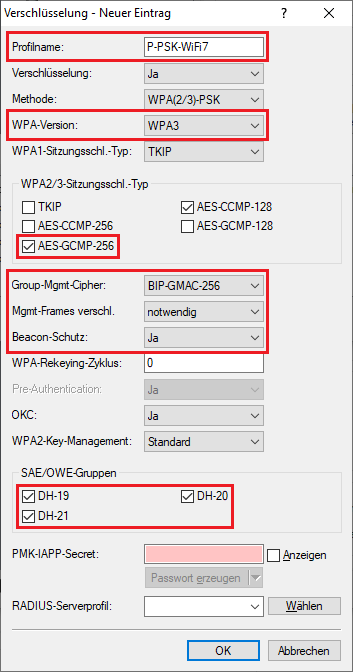
This article describes, which parameters have to be selected for the Wi-Fi 7 encryption profile.
Die Konfiguration eines separaten Verschlüsselungs-Profils für Wi-Fi 7 kann aktuell ausschließlich auf einem Standalone Access Point per LANconfig erfolgen. Per WEBconfig ist dies nicht möglich. Weiterhin ist es aktuell auch nicht möglich, ein separates Verschlüsselungs-Profils für Wi-Fi 7 in einem WLAN-Controller sowie in der LMC zu erstellen und dem Access Point zuzuweisen.
Verschlüsselungs-Profil für WiFi 7 zertifizierten Betrieb hinzufügen |
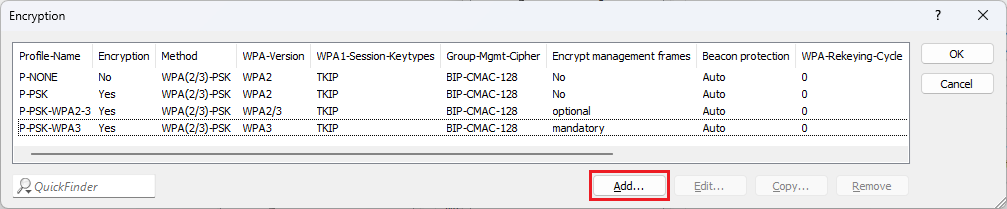
1) Open the configuration of the access point in LANconfig and go to the menu Wireless-LAN → WLAN-Netzwerke → Verschlüsselung.
2. Klicken Sie auf Hinzufügen, um ein neues Verschlüsselungs-Profil zu erstellen.
3. Passen Sie die folgenden Parameter an:
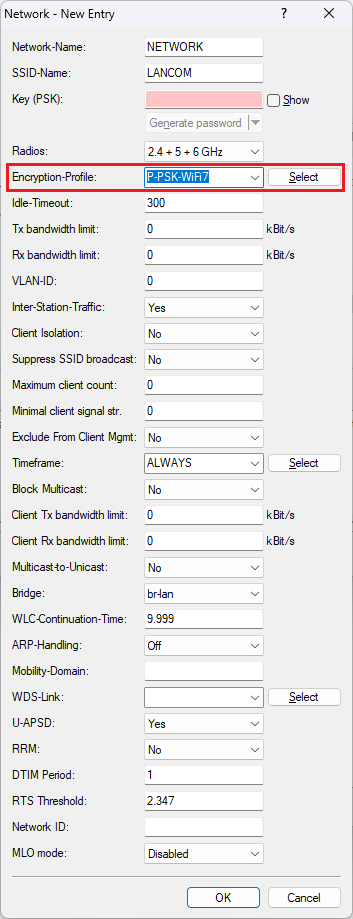
Das Verschlüsselungs-Profil kann anschließend in einem WLAN-Netzwerk ausgewählt werden (in dem Menü Wireless-LAN → WLAN-Netzwerke → Netzwerke).
|
|