Description:
Virtual Port Channel (VPC) is a virtualization technology that makes two interconnected switches appear as a single layer 2 logical node for devices at the underlying access level. This is ensured by the virtual port channel network established via VPC, called the "VPC-Peer-Link". The connected devices can be a switch, server or other network device that supports the link aggregation technology.
This article describes, how VPC can be configured on LANCOM Switches with LCOS SX 5.20 / 5.30.
Either stacking or VPC can be used, but not both. The VPC implementation in LANCOM switches is not compatible with the implementation of other manufacturers. |
VPC must be configured via the serial interface, otherwise the connection to the switch will be lost by changing the management VLAN. |
Requirements:
- Two of the following LANCOM switch models:
- Serial cable for accessing the switches via the serial interface
- CLI client for accessing the switches via the serial interface (e.g. PuTTY)
Scenario:
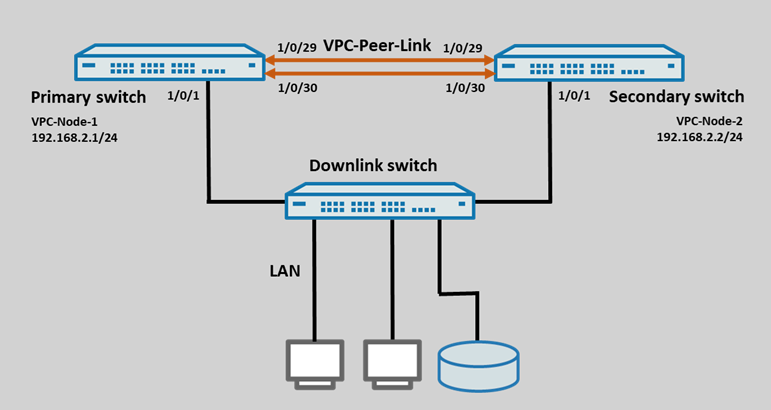
- Two XS-4530YUP switches are to be connected with each other via VPC.
- The stack ports 1/0/29 and 1/0/30 are used for the VPC peer link.
- In the local network the VPC-Node-1 has the IP address 192.168.2.1/24 and the VPC-Node-2 the IP address 192.168.2.2/24.
- A downlink switch is to be connected via port 1/0/1 of the two VPC nodes.
Procedure:
1) Configuring VPC on the VPC-Node-1:
1.1) Changing the stacking ports to the "Ethernet" mode:
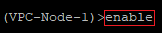
1.1.1) Connect to the first switch (VPC-Node-1) via the serial interface and enter the command enable to gain extended rights.
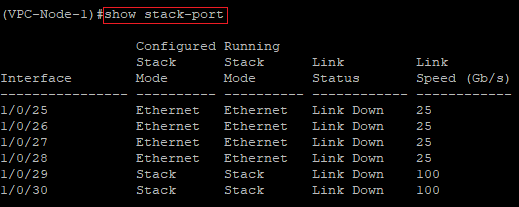
1.1.2) Enter the command show stack-port to check, which ports are configured in "Stack" mode. In this example the ports 1/0/29 and 1/0/30 are configured in this way.
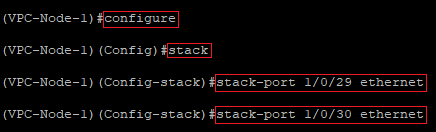
1.1.3) Modify the following parameters:
- Enter the command configure to open the configuration menu.
- Enter the command stack to open the stack configuration.
- Afterwards, change the port mode for both ports from Stack to Ethernet with the command stack-port <Port number> ethernet.
- In this example the commands are as follows:
- stack-port 1/0/29 ethernet
- stack-port 1/0/30 ethernet
1.1.4) Modify the following parameters:
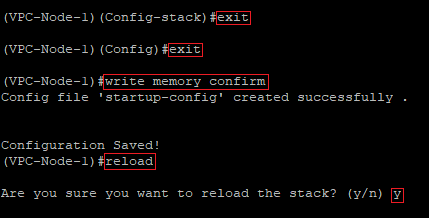
- Enter the command exit twice to return to the root level of the switch.
- Enter the command write memory confirm to save the configuration as the start configuration. With the parameter confirm the write process does not have to be confirmed.
- Afterwards, perform a a restart of the switch with the command reload and acknowledge the query with the <y> key.
The restart of the switch is mandatory to change the port mode from Stack to Ethernet. |
1.2) Check the port change and activate VPC:
1.2.1) Modify the following parameters:
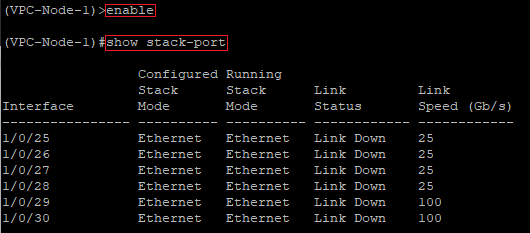
- Reconnect to the switch via the CLI after the restart and enter the command enable to gain extended rights.
- Check with the command show stack-port, if the port mode has been changed to Ethernet.
1.2.2) Modify the following parameters:
- Enter the command configure to open the configuration menu.
- Activate the VPC functionality with the command feature vpc.

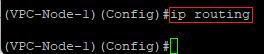
1.2.3) Activate the routing functionality with the command ip routing.
1.3) Configure the Layer 3 interface for the VPC keepalive:
For the VPC keepalive (split-brain detection), both switches require a dedicated layer 3 interface. Either an outband interface (service port / OOB) or an in-band interface (VLAN interface) can be used for this task. On switches with a service port, LANCOM Systems recommends to use this for the VPC keepalive. Only the XS-6128QF does not have a service port, so a VLAN interface must be configured on it for keepalive. |
1.3.1) Configure the Layer 3 interface for the VPC keepalive on the service port (XS-4530YUP, XS-4554YUP, YS-7154CF, CS-8132F):
1.3.1.1) Modify the following parameters:
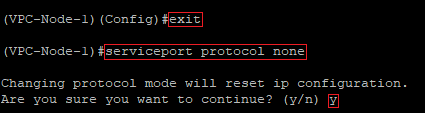
- Enter the command exit to return to the root level of the switch.
- Deactivate DHCP on the service port with the command serviceport protocol none and acknowledge the query with the <y> key.
1.3.1.2) Modify the following parameters:
- Afterwards, assign an IP address from an unused network as well as a subnetmask to the service port with the command serviceport ip <IP address> <subnetmask>.
- In this example, the command is as follows:
- serviceport ip 10.10.10.1 255.255.255.0

If the VPC nodes also should be able to communicate with the Internet, a gateway must be specified on the service port as well. Use the command serviceport ip <IP address> <subnetmask> <default gateway> to do this. In this example, the command is as follows: serviceport ip 10.10.10.1 255.255.255.0 10.10.10.100 
|
1.3.2) Configure the Layer 3 interface for the VPC keepalive on a VLAN interface (XS-6128QF only):
1.3.2.1) Modify the following parameters:
- Enter the command exit to return to the root level of the switch.
- Enter the command vlan database to open the VLAN configuration.
- Create a new VLAN with the command vlan <VLAN ID>. The VLAN must still be unused.
- In this example the command is as follows:
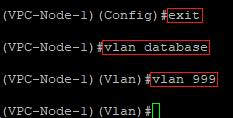
1.3.2.2) Modify the following parameters:
- Activate the routing functionality for the VLAN created in step 1.3.2.2 with the command vlan routing <VLAN ID>.
- In this example the command is as follows:

1.3.2.3) Modify the following parameters:
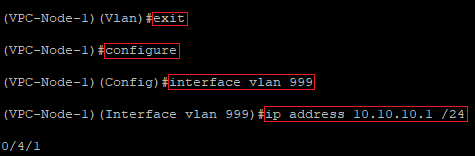
- Enter the command exit to return to the root level of the switch.
- Afterwards, enter the command configure to open the configuration menu.
- Use the command interface vlan <VLAN ID> to switch to the VLAN created in step 1.3.2.2.
- In this example the command is as follows:
- Enter an IP address from an unused network as well as a subnetmask for the VLAN interface with the command ip address <IP address /subnetmask in CIDR notation>.
- In this example the command is as follows::
- ip address 10.10.10.1 /24
1.4) Create the VPC domain and configure the VPC keepalive:
1.4.1) Modify the following parameters:
- Enter the command configure on the root level of the switch to open the configuration menu.
- Create a VPC domain with the command vpc domain 1.
- Configure the keepalive between the two VPC nodes with the command peer-keepalive destination <IP address of the Layer 3 interface on the VPC-Node-2> source <IP address of the Layer 3 interface on the VPC-Node-1>.
- In this example the command is as follows:
- peer-keepalive destination 10.10.10.2 source 10.10.10.1

1.4.2) Modify the following parameters:
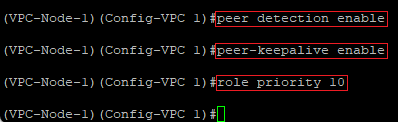
- Use the commands peer detection enable and peer-keepalive enable to activate the keepalive.
- Enter a priority for the VPC keepalive with the command role priority <value>. The priority decides which node becomes the Primary and which one the Secondary. The lower the value, the higher the priority.
- In this example the command is as follows:
1.5) Modify the System MAC:
In order for both VPC nodes to represent themselves to downlink switches without VPC support as one device, a virtual MAC address has to be entered on both VPC nodes.
Modify the following parameters:
- Enter the command system-mac <MAC address> to set a virtual MAC addres for the VPC. This must be the same on both VPC nodes.
- In this example the command is as follows:
- system-mac 7A:E6:B0:6D:DD:EE
To prevent conflicts with other systems, it is recommended to use Locally Administered MAC Address (LAA). If a MAC address generator is used, the U/L Flag = 1 (LAA) should be set. |
If additional VPC nodes are operated in the same scenario, it is mandatory to use a different System MAC on these. Otherwiese, this would lead to communication problems! |

1.6) Create the VPC-Peer-Link:
The Management VLAN must not pass through the VPC-Peer-Link. In the default settings the VLAN 1 is used as the Management VLAN. If this VLAN should pass through the VPC-Peer-Link, the Management VLAN must be replaced by a dummy VLAN and the routing functionality has be activated. |
1.6.1) Modify the following parameters:
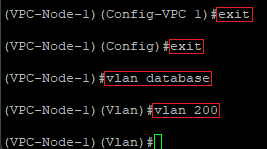
- Enter the command exit twice to return to the root level of the switch.
- Switch to the VLAN configuration with the command vlan database.
- Create a new VLAN with the command vlan <VLAN ID>. The VLAN must still be unused and it serves as a dummy VLAN.
- In this example the command is as follows:
1.6.2) Modify the following parameters:
- Enter the command exit to return to the root level of the switch.
- Replace the previous management VLAN with the dummy VLAN created in step 1.6.1 with the command network mgmt_vlan <VLAN ID>.
- In this example the command is as follows:
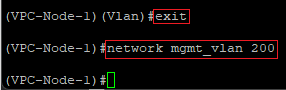
1.6.3) Modify the following parameters:
- Switch to the VLAN configuration again with the command vlan database.
- Activate the routing functionality for the VLAN 1 with the command vlan routing 1.
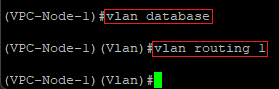
1.6.4) Modify the following parameters:
- Enter the command exit to return to the configuration menu.
- Enter the command configure on the root level of the switch to open the configuration menu.
- Switch to the VLAN 1 with the command interface vlan 1.
- Enter an IP address from an unused network and a subnetmask with the command ip address <IP address /subnetmask in CIDR notation>.
- In this example the command is as follows:
- ip address 192.168.2.1 /24
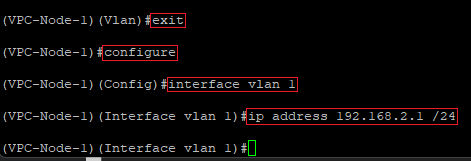
1.6.5) Modify the following parameters:
- Enter the command exit to return to the configuration menu.
- Create a default route for the network created in step 1.6.4 with the command ip route default <IP address of the default gateway>.
- In this example the command is as follows:
- ip route default 192.168.2.100

1.6.6) Modify the following parameters:
- Enter the command ip name server <IP address of a DNS server> to specify a DNS server.
- In this example the command is as follows:
- ip name server 192.168.2.100

1.6.7) Modify the following parameters:
- Create a Link Aggregation Group with the command interface lag <LAG ID>.
- In this example the command is as follows:
- You can optionally add a comment for the created Link Aggregation Group with the command description <comment>. Using quotation marks ensures, that comments with spaces can be used.
- In this example the command is as follows:
- description "VPC-Peer-Link"
- Use the command no spanning-tree port mode to deactivate Spanning Tree for the created Link Aggregation Group.
- Use the command vpc peer-link to activate the VPC-Peer-Link for the created Link Aggregation Group.
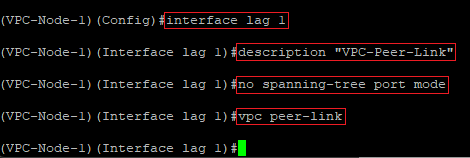
1.6.8) Modify the following parameters:
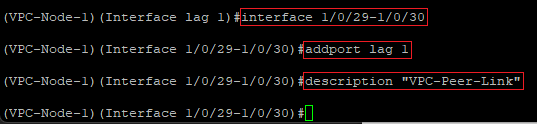
- Use the command interface <Interface 1>-<Interface 2> to edit the ports modified in step 1.1.
- In this example the command is as follows:
- Add the ports to the Link Aggregation group created in step 1.6.7 with the command addport lag 1.
- You can optionally add a comment for the interfaces with the command description <comment>. Using quotation marks ensures, that comments with spaces can be used.
- In this example the command is as follows:
- description "VPC-Peer-Link"
1.6.9) Modify the following parameters:
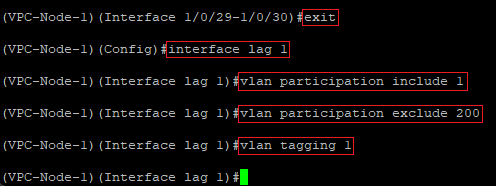
- Enter the command exit to return to the configuration menu.
- Enter the command interface lag 1 to edit the Link Aggregation Group created in step 1.6.7.
- Use the command vlan participation include <VLAN ID> to allow the VLANs, which should communicate via the VPC Link.
- In this example the command is as follows:
- vlan participation include 1
- Use the command vlan participation exclude <VLAN ID> to ban the Management VLAN, as it is not allowed to communicate via the VPC Peer Link.
- In this example the command is as follows:
- vlan participation exclude 200
- Use the command vlan tagging <VLAN ID> to activate the VLAN tagging for the VLAN, which should communicate via the VPC Peer Link.
- In this example the command is as follows:
If the Layer 3 interface for the VPC keepalive was configured in step 1.3.2 on an XS-6128QF, additionally the VLAN specified in this step has to be allowed (vlan participate include 999). Activate the VLAN tagging for the VLAN ID specified in step 1.3.2 (vlan tagging 999). 
|
1.7) Prepare the Downlink port to the downlink switches:
1.7.1) Modify the following parameters:
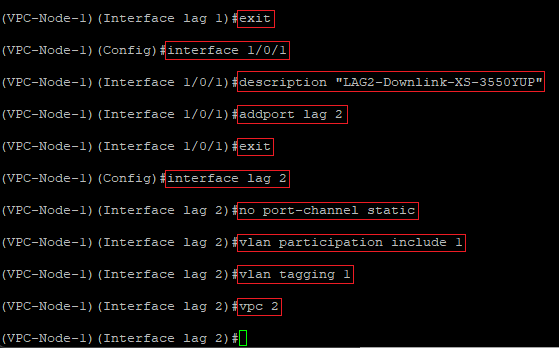
- Enter the command exit to return to the configuration menu.
- Use the command interface <port number> to switch to the port configuration of the port, the downlink switch should be connected to.
- In this example the command is as follows:
- You can optionally enter a comment for the interface with the command description <comment>. Using quotation marks ensures, that comments with spaces can be used.
- In this example the command is as follows:
- description "LAG2-Downlink-XS-3550YUP"
- Add the port to a new Link Aggregation Group with the command addport <LAG ID>.
- In this example the command is as follows:
- Enter the command exit to return to the configuration menu.
- Switch to the Link Aggregation Group you just created via the command interface lag <LAG ID>.
- In this example the command is as follows:
- Enter the command no port-channel static so that LACP is used.
- Use the command vlan participation include <VLAN ID> to allow the VLANs, which should communicate with the downlink switch.
- In this example the command is as follows:
- vlan participation include 1
- Use the command vlan tagging <VLAN ID> to activate the VLAN tagging for the VLANs, which should communicate with the downlink switch.
- In this example the command is as follows:
- Enter the command vpc <domain> to create an additional VPC domain. The same VPC domain has to be used on the downlink of both VPC nodes.
- In this example the command is as follows:
1.7.2) Modify the following parameters:
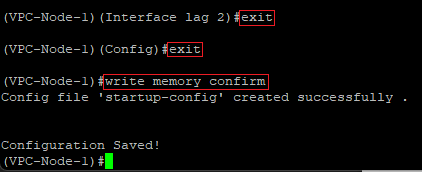
- Enter the command exit twice to return to the root level of the switch.
- Finally, enter the command write memory confirm to save the configuration as the start configuration. The parameter confirm causes, that no futher query is made.
1.7.3) This concludes the VPC configuration on the VPC-Node-1.
2. Konfiguration von VPC auf dem VPC-Node-2:
2.1 Wechsel der Stacking-Ports in den Modus "Ethernet":
2.1.1 Verbinden Sie sich über die serielle Schnittstelle mit dem zweiten Switch (VPC-Node-2) und geben den Befehl enable ein, um erweiterte Rechte zu erlangen.

2.1.2 Geben Sie den Befehl show stack-port ein, um zu prüfen, welche Ports noch im Modus Stack konfiguriert sind. In diesem Beispiel sind das die Ports 1/0/29 und 1/0/30.
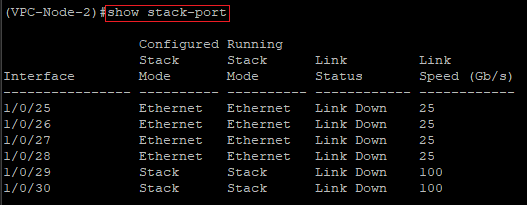
2.1.3 Modify the following parameters:
- Geben Sie den Befehl configure ein, um in das Konfigurations-Menü zu gelangen.
- Geben Sie den Befehl stack ein, um in die Stack-Konfiguration zu gelangen.
- Ändern Sie anschließend mit dem Befehl stack-port <Port-Nummer> ethernet für beide Ports den Modus von Stack auf Ethernet.
- In diesem Beispiel lauten die Befehle also wie folgt:
- stack-port 1/0/29 ethernet
- stack-port 1/0/30 ethernet
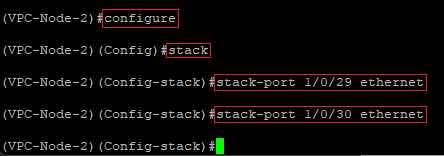
2.1.4 Modify the following parameters:
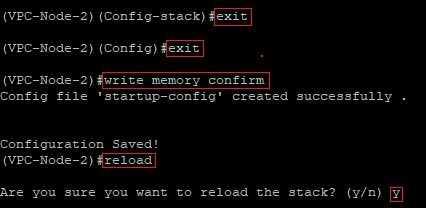
- Geben Sie zweimal hintereinander den Befehl exit ein, um wieder in die Root-Ebene vom Switch zu gelangen.
- Geben Sie anschließend den Befehl write memory confirm ein, um die Konfiguration als Start-Konfiguration zu speichern. Der Parameter confirm bewirkt dabei, dass keine weitere Abfrage erfolgt.
- Führen Sie anschließend einen Neustart des Switches mit dem Befehl reload aus und bestätigen die Abfrage mit der Taste <y>.
Der Neustart vom Switch ist zwingend erforderlich, um den Port-Modus von Stack auf Ethernet zu ändern. |
2.2 Port-Änderung kontrollieren und VPC aktivieren:
2.2.1 Modify the following parameters:
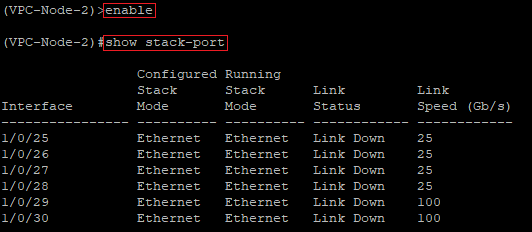
- Verbinden Sie sich nach dem Neustart vom Switch erneut per Konsole mit diesem und geben den Befehl enable ein, um erweiterte Rechte zu erlangen.
- Kontrollieren Sie mit dem Befehl show stack-port, ob der Port-Modus auf Ethernet gewechselt wurde.
2.2.2 Passen Sie die folgenden Parameter an:
- Geben Sie den Befehl configure ein, um in das Konfigurations-Menü zu gelangen.
- Aktivieren Sie mit dem Befehl feature vpc die VPC-Funktionalität.

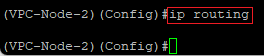
2.2.3 Aktivieren Sie mit dem Befehl ip routing global die Routing-Funktion.
2.3 Layer-3-Interface für das VPC-Keepalive einrichten:
Für den VPC-Keepalive (Split-Brain-Erkennung) benötigen beide Switches ein dediziertes Layer-3-Interface. Für diese Aufgabe kann entweder ein Outband-Interface (Service-Port / OOB) oder ein Inband-Interface (VLAN-Interface) verwendet werden. LANCOM Systems empfiehlt auf Switches mit Service-Port diesen für das VPC-Keepalive zu verwenden. Lediglich der XS-6128QF verfügt nicht über einen Service-Port, sodass auf diesem für das Keepalive ein VLAN-Interface konfiguriert werden muss. |
2.3.1 Layer-3-Interface für das VPC-Keepalive auf den Service-Port einrichten (XS-4530YUP, XS-4554YUP, YS7154CF, CS-8132F):
2.3.1.1 Passen Sie die folgenden Parameter an:
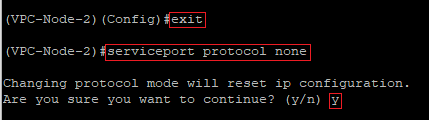
- Geben Sie den Befehl exit ein, um wieder in die Root-Ebene vom Switch zu gelangen.
- Deaktivieren Sie mit dem Befehl serviceport protocol none DHCP auf dem Service-Port und bestätigen die Abfrage mit der Taste <y>.
2.3.1.2 Passen Sie die folgenden Parameter an:
- Weisen Sie dem Service-Port anschließend mit dem Befehl serviceport ip <IP-Adresse> <Subnetzmaske> eine IP-Adresse aus einem bisher nicht verwendeten Netzwerk samt passender Subnetzmaske zu.
- In diesem Beispiel sieht der Befehl wie folgt aus:
- serviceport ip 10.10.10.2 255.255.255.0

Sollen die VPC-Nodes auch mit dem Internet kommunizieren, muss auf dem Service-Port zusätzlich ein Gateway angegeben werden. Verwenden Sie dazu den Befehl serviceport ip <IP-Adresse> <Subnetzmaske> <Default-Gateway>. In diesem Beispiel sieht der Befehl also wie folgt aus: serviceport ip 10.10.10.2 255.255.255.0 10.10.10.100 
|
2.3.2 Layer-3-Interface für das VPC-Keepalive auf einem VLAN-Interface einrichten (nur XS-6128QF):
2.3.2.1 Passen Sie die folgenden Parameter an:
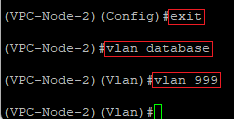
- Geben Sie den Befehl exit ein, um wieder in die Root-Ebene vom Switch zu gelangen.
- Geben Sie den Befehl vlan database ein, um in die VLAN-Konfiguration zu gelangen.
- Erstellen Sie mit dem Befehl vlan <VLAN-ID> ein neues VLAN. Dieses darf bisher nicht verwendet werden.
- In diesem Beispiel lautet der Befehl wie folgt:
2.3.2.2 Passen Sie die folgenden Parameter an:
- Aktivieren Sie für das in Schritt 2.3.2.1 erstellte VLAN die Routing-Funktion mit dem Befehl vlan routing <VLAN-ID>.
- In diesem Beispiel lautet der Befehl wie folgt:

2.3.2.3 Passen Sie die folgenden Parameter an:
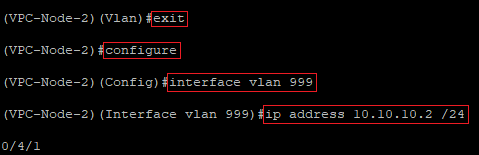
- Geben Sie den Befehl exit ein, um wieder in die Root-Ebene vom Switch zu gelangen.
- Geben Sie anschließend den Befehl configure ein, um in das Konfigurations-Menü zu gelangen.
- Wechseln Sie mit dem Befehl interface vlan <VLAN-ID> in das Interface für das in Schritt 2.3.2.1 erstellte VLAN.
- In diesem Beispiel lautet der Befehl also wie folgt:
- Vergeben Sie für das VLAN-Interface mit dem Befehl ip address <IP-Adresse /Subnetzmaske in CIDR-Schreibweise> eine IP-Adresse aus einem bisher nicht verwendeten Netzwerk samt passender Subnetzmaske.
- In diesem Beispiel lautet der Befehl wie folgt:
- ip address 10.10.10.2 /24
2.4 VPC-Domain erstellen und VPC-Keepalive aktivieren:
2.4.1 Passen Sie die folgenden Parameter an:
- Geben Sie auf der Root-Ebene vom Switch den Befehl configure ein, um in das Konfigurations-Menü zu gelangen.
- Erstellen Sie mit dem Befehl vpc domain 1 eine VPC-Domain.
- Richten Sie mit dem Befehl peer-keepalive destination <IP-Adresse des Layer-3-Interfaces auf dem VPC-Node-1> source <IP-Adresse des Layer-3-Interfaces auf dem VPC-Node-2> das Keepalive zwischen den beiden VPC-Nodes ein.
- In diesem Beispiel lautet der Befehl wie folgt:
- peer-keepalive destination 10.10.10.1 source 10.10.10.2

2.4.2 Passen Sie die folgenden Parameter an:
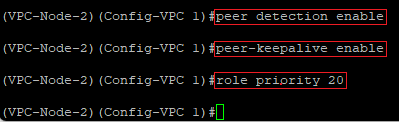
- Aktivieren Sie mit den Befehlen peer detection enable und peer-keepalive enable das Keepalive.
- Vergeben Sie mit dem Befehl role priority <Wert> eine Priorität für das VPC-Keepalive. Diese Priorität entscheidet, welcher Node Primary und welcher Secondary wird. Je niedriger der Wert, desto höher die Priorität.
- In diesem Beispiel lautet der Befehl wie folgt:
2.5 System-MAC anpassen:
Damit sich beide VPC-Nodes gegenüber untergerordneten Switches ohne VPC-Unterstützung als ein Gerät präsentieren können, muss auf den beiden VPC-Nodes eine virtuelle MAC-Adresse für das VPC angegeben werden.
Passen Sie die folgenden Parameter an:
- Geben Sie mit dem Befehl system-mac <MAC-Adresse> eine virtuelle MAC-Adresse für das VPC ein. Diese muss auf beiden VPC-Nodes gleich vergeben werden.
- In diesem Beispiel lautet der Befehl wie folgt:
- system-mac 7A:E6:B0:6D:DD:EE
Um Konflikte mit anderen Systemen zu vermeiden, empfiehlt es sich eine Locally Administered MAC Address (LAA) zu verwenden. Wenn ein MAC Address Generator genutzt wird, ist darauf zu achten, dass das U/L Flag = 1 gesetzt wird (LAA). |
Werden weitere VPC-Nodes im Szenario betrieben, muss auf diesen eine abweichende System-MAC vergeben werden. Ansonsten führt dies zu Kommunikations-Problemen! |

2.6 VPC-Peer-Link erstellen:
Das Management-VLAN darf den VPC-Peer-Link nicht passieren. In der Standard-Einstellung ist das VLAN 1 als Management-VLAN hinterlegt. Sofern dieses VLAN den VPC-Peer-Link passieren soll, muss das Management-VLAN durch ein Dummy-VLAN ersetzt und die Routing-Funktion für dieses VLAN aktiviert werden. |
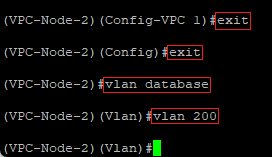
2.6.1 Passen Sie die folgenden Parameter an:
- Geben Sie zweimal hintereinander den Befehl exit ein, um wieder in die Root-Ebene vom Switch zu gelangen.
- Wechseln Sie mit dem Befehl vlan database in die VLAN-Konfiguration.
- Erstellen Sie mit dem Befehl vlan <VLAN-ID> ein neues VLAN. Dieses darf bisher nicht verwendet werden und dient als Dummy-VLAN.
- In diesem Beispiel lautet der Befehl wie folgt:
2.6.2 Passen Sie die folgenden Parameter an:
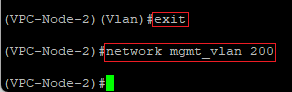
- Geben Sie den Befehl exit ein, um wieder in die Root-Ebene vom Switch zu gelangen.
- Ersetzen Sie mit dem Befehl network mgmt_vlan <VLAN-ID> das bisherige Management-VLAN durch das in Schritt 2.6.1 erstellte Dummy-VLAN.
- In diesem Beispiel lautet der Befehl wie folgt:
2.6.3 Passen Sie die folgenden Parameter an:
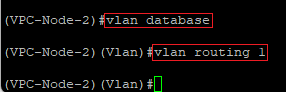
- Wechseln Sie mit dem Befehl vlan database erneut in die VLAN-Konfiguration.
- Aktivieren Sie mit dem Befehl vlan routing 1 die Routing-Funktion für das VLAN 1.
2.6.4 Passen Sie die folgenden Parameter an:
- Geben Sie den Befehl exit ein, um wieder in die Root-Ebene vom Switch zu gelangen.
- Geben Sie auf der Root-Ebene vom Switch den Befehl configure ein, um in das Konfigurations-Menü zu gelangen.
- Wechseln Sie mit dem Befehl interface vlan 1 in das VLAN 1.
- Vergeben Sie mit dem Befehl ip address <IP-Adresse /Subnetzmaske in CIDR-Schreibweise> eine IP-Adresse aus einem bisher nicht verwendeten Netzwerk samt passender Subnetzmaske.
- In diesem Beispiel lautet der Befehl wie folgt:
- ip address 192.168.2.2 /24
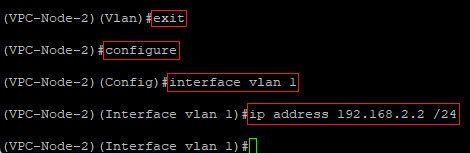
2.6.5 Passen Sie die folgenden Parameter an:
- Geben Sie den Befehl exit ein, um wieder in das Konfigurations-Menü zu gelangen.
- Erstellen Sie mit dem Befehl ip route default <IP-Adresse des Default-Gateways> eine Default-Route für das in Schritt 2.6.4 erstellte Netzwerk.
- In diesem Beispiel lautet der Befehl wie folgt:
- ip route default 192.168.2.100

2.6.6 Passen Sie die folgenden Parameter an:
- Geben Sie mit dem Befehl ip name server <IP-Adresse eines DNS-Servers> einen DNS-Server an.
- In diesem Beispiel lautet der Befehl wie folgt:
- ip name server 192.168.2.100

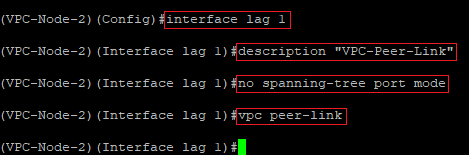
2.6.7 Passen Sie die folgenden Parameter an:
- Erstellen Sie mit dem Befehl interface lag <LAG-ID> eine Link Aggregation Group.
- In diesem Beispiel lautet der Befehl wie folgt:
- Ergänzen Sie optional mit dem Befehl description <Kommentar> einen Kommentar für die erstellte Link Agreggation Group. Die Anführungszeichen sind sinnvoll, weil dadurch auch Kommentare mit Leerzeichen angegeben werden können.
- In diesem Beispiel lautet der Befehl wie folgt:
- description "VPC-Peer-Link"
- Deaktivieren Sie mit dem Befehl no spanning-tree port mode Spanning-Tree für die erstellte Link Aggregation Group.
- Aktivieren Sie mit dem Befehl vpc peer-link den VPC-Peer-Link auf der erstellten Link Aggregation Group.
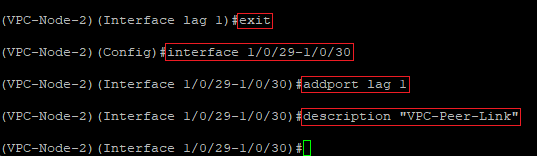
2.6.8 Passen Sie die folgenden Parameter an:
- Bearbeiten Sie mit dem Befehl interface <Interface 1>-<Interface 2> die in Schritt 2.1 angepassten Ports.
- In diesem Beispiel lautet der Befehl wie folgt:
- Fügen Sie die Ports mit dem Befehl addport lag 1 zu der in Schritt 2.6.7 erstellten Link Aggregation Group hinzu.
- Vergeben Sie optional mit dem Befehl description <Kommentar> einen Kommentar für die erstellte Link Agreggation Group. Die Anführungszeichen sind sinnvoll, weil dadurch auch Kommentare mit Leerzeichen angegeben werden können.
- In diesem Beispiel lautet der Befehl wie folgt:
- description "VPC-Peer-Link"
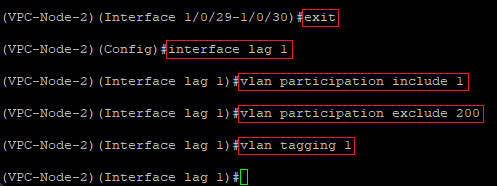
2.6.9 Passen Sie die folgenden Parameter an:
- Geben Sie den Befehl exit ein, um wieder in das Konfigurations-Menü zu gelangen.
- Geben Sie den Befehl interface lag 1 ein, um die in Schritt 2.6.7 erstellte Link Aggregation Group zu bearbeiten.
- Erlauben Sie mit dem Befehl vlan participation include <VLAN-ID> die VLANs, welche über den VPC-Link kommunizieren dürfen.
- In diesem Beispiel lautet der Befehl wie folgt:
- vlan participation include 1
- Verbieten Sie mit dem Befehl vlan participation exclude <VLAN-ID> das Management-VLAN, da dieses nicht über den VPC-Peer-Link kommunizieren darf.
- In diesem Beispiel lautet der Befehl wie folgt:
- vlan participation exclude 200
- Aktivieren Sie mit dem Befehl vlan tagging <VLAN-ID> das VLAN-Tagging für das VLAN, welches über den VPC-Peer-Link kommunizieren soll.
- In diesem Beispiel lautet der Befehl wie folgt:
Wurde das Layer-3-Interface für das VPC-Keepalive in Schritt 1.3.2 auf einem XS-6128QF eingerichtet, muss zusätzlich das dort vergebene VLAN erlaubt werden (vlan particpate include 999). Aktivieren Sie für die in Schritt 1.3.2 vergebene VLAN-ID das VLAN-Tagging (vlan tagging 999). 
|
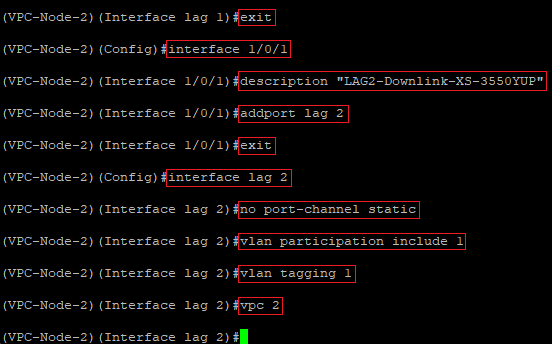
2.7 Downlink-Port zu untergeordneten Switches vorbereiten:
2.7.1 Passen Sie die folgenden Parameter an:
- Geben Sie den Befehl exit ein, um wieder in das Konfigurations-Menü zu gelangen.
- Wechseln Sie mit dem Befehl interface <Port-Nummer> in die Port-Konfiguraton des Ports, an den der untergeordnete Switch angeschlossen werden soll.
- In diesem Beispiel lautet der Befehl wie folgt:
- Vergeben Sie optional mit dem Befehl description <Kommentar> einen Kommentar für das Interface. Die Anführungszeichen sind sinnvoll, weil dadurch auch Kommentare mit Leerzeichen angegeben werden können.
- In diesem Beispiel lautet der Befehl wie folgt:
- description "LAG2-Downlink-XS-3550YUP"
- Fügen Sie den Port mit dem Befehl addport <LAG-ID> zu einer neuen Link Aggregation Group hinzu.
- In diesem Beispiel lautet der Befehl wie folgt:
- Geben Sie den Befehl exit ein, um wieder in das Konfigurations-Menü zu gelangen.
- Wechseln Sie mit dem Befehl interface lag <LAG-ID> in die soeben erstellte Link Aggregation Group.
- In diesem Beispiel lautet der Befehl wie folgt:
- Geben Sie den Befehl no port-channel static ein, damit LACP verwendet wird.
- Erlauben Sie mit dem Befehl vlan participation include <VLAN-ID> die VLANs, welche mit dem untergordneten Switch kommunizieren dürfen.
- In diesem Beispiel lautet der Befehl wie folgt:
- vlan participation include 1
- Aktivieren Sie mit dem Befehl vlan tagging <VLAN-ID> das VLAN-Tagging für die VLANs, welche mit dem untergeordneten Switch kommunizieren dürfen.
- In diesem Beispiel lautet der Befehl wie folgt:
- Geben Sie den Befehl vpc <Domain> ein, um eine weitere VPC-Domain anzulegen. Auf dem Downlink der beiden VPC-Nodes muss die gleiche VPC-Domain verwendet werden.
- In diesem Beispiel lautet der Befehl wie folgt:
2.7.2 Passen Sie die folgenden Parameter an:
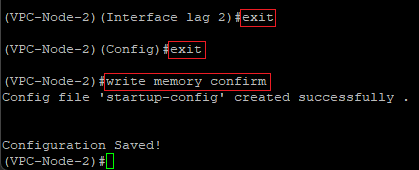
- Geben Sie zweimal hintereinander den Befehl exit ein, um wieder in die Root-Ebene vom Switch zu gelangen.
- Geben Sie abschließend den Befehl write memory confirm ein, um die Konfiguration als Start-Konfiguration zu speichern. Der Parameter confirm bewirkt dabei, dass keine weitere Abfrage erfolgt.
2.7.3 Die VPC-Konfiguration auf dem VPC-Node-2 ist damit abgeschlossen.
3. Weiterführende Schritte:
Konfigurieren Sie auf dem Downlink-Switch LACP, wie in einem der folgenden Knowledge Base Artikel beschrieben:
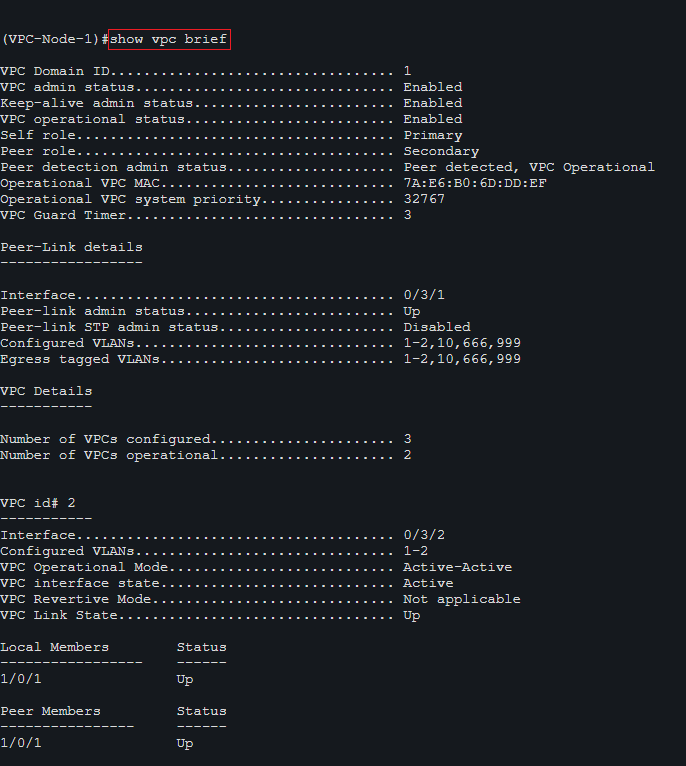
4. VPC-Status auf den VPC-Nodes auslesen:
Den VPC-Status können Sie auf den VPC-Nodes über den Konsolen-Befehl show vpc brief auslesen.


  Thank you for your feedback! You can also send us constructive suggestions for improving our knowledge base or ideas for new articles by email to knowledgebase@lancom.de. |
|
