Description:
This document describes how to set up the blocking and override settings in the LANCOM Content Filter.
Requirements:
Blocking settings in the LANCOM Content-Filter:
The settings for blocking as used by the LANCOM Content Filter are adjusted under the following menu items:
- LANconfig: Content Filter → Blocking/Override
- WEBconfig: LCOS Menu Tree → Setup → UTM → Content Filter → Global settings

- Alternative blocking URL:
This is where you can enter the address of an alternative URL. If access is blocked, the URL entered here will be displayed instead of the requested web site. You can use this external HTML page to display your company's corporate design, for example, or to perform functions such as JavaScript routines, etc. You can also use the same HTML tags here as used in the blocking text. If you do not make any entry here, the default page stored in the device will be displayed.- Possible values:
- Valid URL address (default: Blank)
- Alternative error URL:
This is where you can enter the address of an alternative URL. If an error occurs, the URL entered here will be displayed instead of the requested web site. You can use this external HTML page to display your company's corporate design, for example, or to perform functions such as JavaScript routines, etc. You can also use the same HTML tags here as used in the error text. If you do not make any entry here, the default page stored in the device will be displayed.- Possible values: Valid URL address (default: Blank)
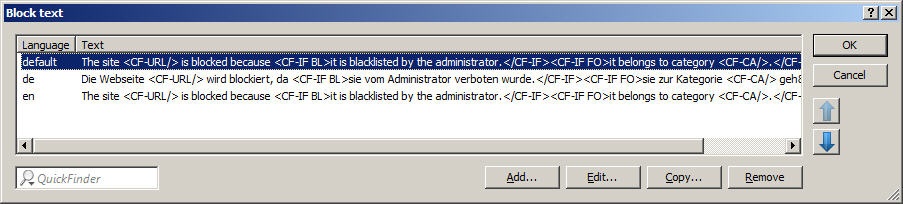
Block text / Error text
This is where you can define text to be displayed when blocking or an error occurs. Different blocking or error texts can be defined for different languages. The display of blocking text is controlled by the language setting transmitted by the browser (user agent).
- Language:
- Entering the appropriate country code here ensures that users receive all messages in their browser's preset language. If the country code set in the browser is found here, the matching text will be displayed. You can add any other language.
- Possible values:
- 10 alphanumerical characters (default: Blank)
Examples of the country code: - de-DE: German-Germany
- de-CH: German-Switzerland
- de-AT: German-Austria
- en-GB: English-Great Britain
- en-US: English-USA
The country code must match the browser language setting exactly, e,g, "de-DE" must be entered for German ("de" on its own is not sufficient). If the country code set in the browser is not found in this table, or if the text stored under that country code is deleted, the predefined default text ("default") will be used. You can modify the default text. |
- Text:
- Enter the text that you wish to use as blocking or error text for this language.
- Possible values: 254 alphanumerical characters (default: Blank)
- Special values:
- You can also use special tags for blocking text if you wish to display different pages depending on the reason why the web site was blocked (e.g. forbidden category or entry in the blacklist). The following tags can be used as tag values:
- <CF-URL/> for a forbidden URL
- <CF-CATEGORIES/> for the list of categories why the web site was blocked
- <CF-PROFILE/> for the profile name
- <CF-OVERRIDEURL/> for the URL used to activate the URL (this can be integrated in a simple <a> tag or in a button)
- <CF-LINK/> adds a link for activating the override
- <CF-BUTTON/> for a button that activates the override. You can use a tag with attributes to display or hide parts of the HTML document: <CF-IF att1 att2> ... </CF-IF>. Possible attributes are:
- BLACKLIST: If the site was blocked because it is in the profile blacklist+
- CATEGORY: If the site was blocked due to one of its categories
- ERR: If an error has occurred. Since there are separate text tables for the blocking page and the error page, this tag only makes sense if you have configured an alternative URL to show on blocking.
- OVERRIDEOK: If users have been allowed an override (in this case, the page should display an appropriate button)
- If several attributes are defined in one tag, the section will be displayed if at least one of these conditions is met. All tags and attributes can be abbreviated to the first two letters (e.g. CF-CA or CF-IF BL). This is necessary as the blocking text may only contain a maximum of 254 characters.
Example: <CF-URL/> is blocked because it matches the categories <CF-CA/>.</p><p>Your content profile is <CF-PR/>.</p><p><CF-IF OVERRIDEOK></p><p><CF-BU/></CF-IF>
The tags described here can also be used in external HTML pages (alternative URLs to show on blocking). |
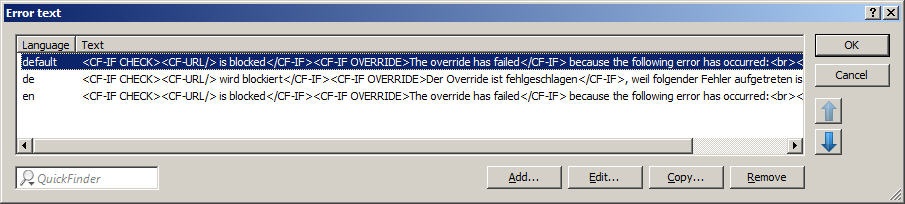
Error text:
- Language:
- Entering the appropriate country code here ensures that users receive all messages in their browser's preset language. If the country code set in the browser is found here, the matching text will be displayed. You can add any other language.
- Possible values:
- 10 alphanumerical characters (default: Blank)
Examples of the country code: - de-DE: German-Germany
- de-CH: German-Switzerland
- de-AT: German-Austria
- en-GB: English-Great Britain
- en-US: English-USA
The country code must match the browser language setting exactly, e,g, "de-DE" must be entered for German ("de" on its own is not sufficient). If the country code set in the browser is not found in this table, or if the text stored under that country code is deleted, the predefined default text ("default") will be used. You can modify the default text. |
- Text:
- Enter the text that you wish to use as error text for this language.
- Possible values: 254 alphanumerical characters (default: Blank)
- Special values:
- You can also use HTML tags for the error text. The following empty element tags can be used as tag values:
- <CF-URL/> for a forbidden URL
- <CF-PROFILE/> for the profile name
- <CF-ERROR/> for the error message
Example: <CF-URL/> is blocked because an error has occurred: </p><p><CF-ERROR/>
Override settings in the LANCOM Content-Filter:The override function allows a website to be accessed even though it is classified as blocked. The user must click on the override button to confirm that the blocked page should be opened. You can configure this feature so that the administrator is notified when the override button is clicked (Content filter → Options).
- Override activated:
This is where you can activate the override function and make further related settings. - Override duration
The time for which the override remains in effect can be restricted here. When this period expires, any attempt to access the same domain and/or category will be blocked again. Clicking on the override button once more allows the web site to be accessed again for the duration of the override and, depending on the settings, the administrator will be notified once more.- Possible values: 1-1440 minutes (default: 5 minutes)
- Override type:
This is where you can set the type of override. It can be allowed for the domain, for the category of web site to be blocked, or for both.- Possible values: (default: Category-and-Domain)
- Category: For the duration of the override, all URLs are allowed that fall under the affected categories (in addition to those that would already have been allowed even without the override).
- Domain: For the duration of the override all URLs in this domain are allowed, irrespective of the categories they belong to.
- Category-and-Domain: For the duration of the override, all URLs are allowed that belong to this domain and also to the allowed categories. This is the highest restriction.
- By clicking on the override button, the user makes all of the categories for that URL accessible. The blocking page that is displayed initially shows just one category explaining why access to the URL was blocked. After clicking on the override button, all of the allowed categories are displayed.
- LANconfig: Content Filter → Blocking/Override
- WEBconfig: LCOS Menu Tree → Setup → UTM -> Content Filter → Global settings
|

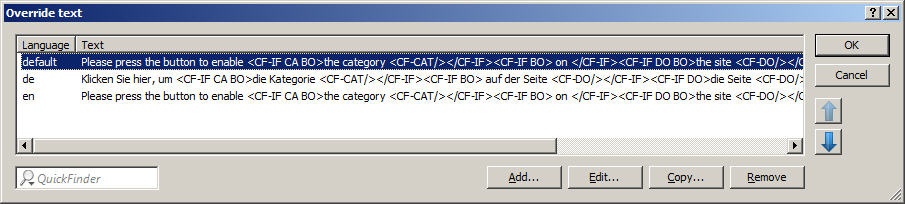
Override text:
This is where you can define text that is displayed to users confirming an override.
- Language:
- Entering the appropriate country code here ensures that users receive all messages in their browser's preset language. If the country code set in the browser is found here, the matching text will be displayed. You can add any other language.
- Possible values:
- 10 alphanumerical characters (default: Blank)
Examples of the country code: - de-DE: German-Germany
- de-CH: German-Switzerland
- de-AT: German-Austria
- en-GB: English-Great Britain
- en-US: English-USA
The country code must match the browser language setting exactly, e,g, "de-DE" must be entered for German ("de" on its own is not sufficient). If the country code set in the browser is not found in this table, or if the text stored under that country code is deleted, the predefined default text ("default") will be used. You can modify the default text. |
- Text:
- Enter the text that you wish to use as override text for this language.
- Possible values: 254 alphanumerical characters (default: Blank)
- Special values:
- You can also use HTML tags for blocking text if you wish to display different pages depending on the reason why the web site was blocked (e.g. blocked category or entry in the blacklist). The following tags can be used as tag values:
- <CF-URL/> for the originally blocked URL that is now allowed
- <CF-CATEGORIES/> for the list of categories that have now been allowed as a result of the override (except if domain override is specified).
- <CF-BUTTON/> displays an override button that forwards the browser to the original URL.
- <CF-LINK/> displays an override link that forwards the browser to the original URL.
- <CF-HOST/> or <CF-DOMAIN/> displays the host or the domain for the allowed URL. The tags are equivalents and their use is optional.
- <CF-ERROR/> generates an error message in the event that the override fails.
- <CF-DURATION/> displays the override duration in minutes. You can use a tag with attributes to display or hide parts of the HTML document: <CF-IF att1 att2> ... </CF-IF>. Attributes can be:
- CATEGORY when the override type is "Category" and the override was successful
- DOMAIN when the override type is "Domain" and the override was successful
- BOTH when the override type is "Category-and-Domain" and the override was successful
- ERROR when the override fails
- OK if either CATEGORY or DOMAIN or BOTH are applicable
- If several attributes are defined in one tag, the section should be displayed if at least one of these conditions is met. All tags and attributes can be abbreviated to the first two letters (e.g. CF-CA or CF-IF BL). This is necessary as the blocking text may only contain a maximum of 254 characters.
Example: <CF-IF CA BO>The categories <CF-CAT/> are</CF-IF><CF-IF BO> in the domain <CF-DO/></CF-IF><CF-IF DO>The domain <CF-DO/> is</CF-IF><CF-IF OK> released for <CF-DU/> minutes.<br><CF-LI/></CF-IF><CF-IF ERR>Override error:<br><CF-ERR/></CF-IF>