
Description:
To analyze the network communication it is often necessary to record network traffic at a switch port. This can be implemented via a port mirroring on managed switches. In doing so, the network traffic is mirrored from one or multiple switch ports to another switch port where a network participant records the traffic for later analysis.
This article describes how to configure port mirroring on a GS-24xx / GS-3xxx / XS-3xxx series switch.
Important note regarding the capturing of data traffic on a mirror port via Wireshark on a Windows Computer
The operating system Windows cannot handle VLAN tags. Therefore a network driver is needed to enable VLAN handling. In many cases the VLAN tags are filtered by the driver, so that they are not included in a Wireshark trace of a mirror port. This can complicate the analysis of VLAN problems in a network enormously.
With some manufacturers, settings can be changed in the driver software, so that the VLAN tags are not filtered anymore. With other manufacturers, changes have to be made in the registry to achieve that.
Additional information can be found on the Wireshark website.
Requirements:
- One of the following LANCOM switch models:
- GS-24xx
- GS-3xxx
- XS-3xxx
- LCOS SX as of version 4.30 for GS-24xx / GS-3xxx / XS-3xxx (download aktuelle Version)
- Any web browser for accessing the webinterface
Procedure:
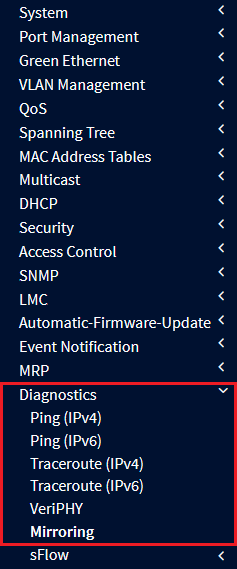
1) Connect to the webinterface of the switch and go to the menu Diagnostics → Mirroring.
2) Click on a Session ID to gain access to the extended settings.
It is possible to configure multiple mirror sessions (Mode to Disabled). However, only one mirror session can be active at one time (Mode to Enabled).

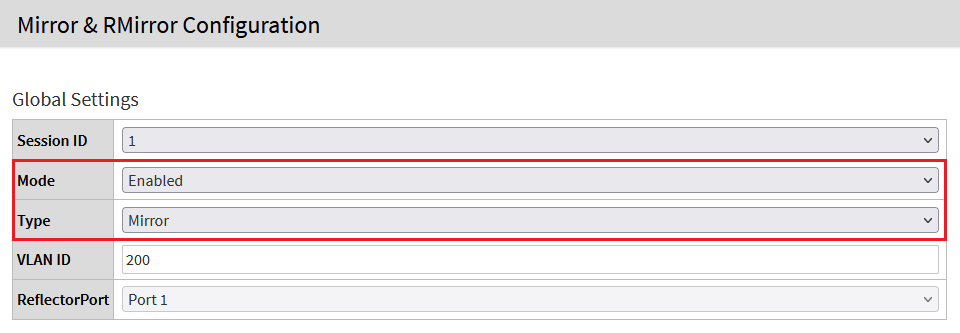
3) For the Mode select the option Enabled and make sure, that the option Mirror is selected for the Type.
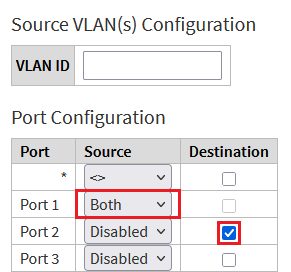
4) For the source port, select the option Both under Source, so that incoming and outgoing packets are transmitted (Rx and Tx). For the destination port, activate the checkbox under Destination.
Click Apply afterwards.
Instead of forwarding all data traffic (Both), this can also be limited to incoming (Rx only) or outgoing data traffic (Tx only).
It is also possible to enter one or multiple VLANs under Source VLAN(s) Configuration instead of selecting the source ports. In doing so, only the traffic from the VLANs entered in this field is transmitted to the destination port. Either the source ports or the source VLANs can be used for the mirroring, but not both.
The negotiated data rate of the destination port has to be at least equivalent to the negotiated data rate of the source port(s). Otherwise, not all network traffic can be recorded, which highly complicates the analysis or even renders it impossible. This is definitely to be considered when using multiple source ports.
Examples:
- Source port 1 GBit and destination port 1 GBit works
- Source port 10 GBit and destination port 1 GBit does not work
- Source ports three times 1 GBit and destination port 10 Gbit works

5) Click on the red disk symbol in the upper right corner to save the configuration as the Start Configuration.
The start configuration is retained even if the device is restarted or there is a power failure.

If the port mirror isn't needed anymore, it has to be deactivated:
- Set the parameter Mode to Disabled in the Global Settings.
- Set the Source for all ports to Disabled in the Port Configuration.
- The last step is to save the configuration as the start configuration via the red disk symbol in the upper right corner.
