Description:
Due to higher bandwith or redundancy needs some scenarios require several switch ports to be combined. This can be implemented with the protocol LACP (Link Aggregation Control Protocol).
This article describes how to configure an LACP Trunk on an GS-3xxx series switch.
In contrast to a Static Trunk the feature LACP supports a dynamic negotiation, thus enabling the Trunk to remain active when a line fails. LANCOM Systems therefore recommends to always use LACP when combining switch ports to a trunk.
Requirements:
- GS-3xxx series switch
- LCOS SX as of version 4.00 Rel ( download latest version )
- Any Web browser for accessing the webinterface
Procedure:
Conduct the following steps on both switches, which are to be connected with each other via an LACP Trunk.
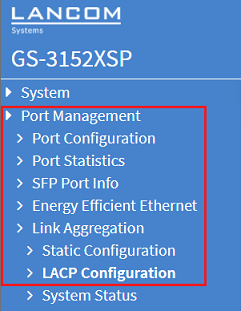
1) Connect to the webinterface of the device and go to the menu Port Management → Link Aggregation → LACP Configuration.
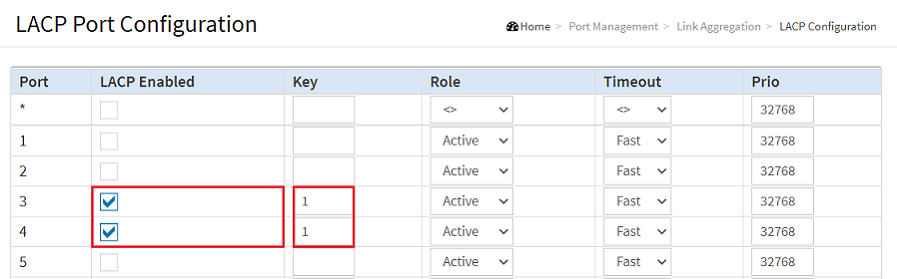
2) Change the following parameters and click Apply:
- LACP Enabled: Set the checkmark at LACP Enabled for all ports to be combined via LACP (in this example the ports 3 and 4).
- Key: Enter the same Key for all ports within an LACP Trunk (in this example the digit 1), so that the assignment is unambiguous.

3) With the configuration complete, click on the "floppy disk" symbol to save the configuration as the boot configuration .
The start configuration is retained even if the device is restarted or there is a power failure.

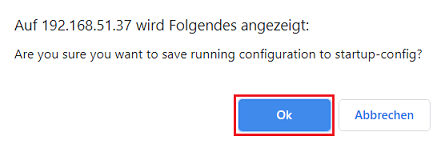
4) Acknowledge the query by clicking Ok.