Description:
LANCOM Systems recommends deactivating unused "Application Layer Gateways" (ALG), also with regard to security vulnerabilities such as "NAT Slipstream", or restricting communication between the ALGs.
This article describes which ALGs run on LCOS devices and how to deactivate or restrict these.
Before deactivating or restricting the ALGs, check whether your software is using any of the associated protocols.
- FTP: FTP is a popular protocol. Restricting the relevant ALG causes “Active FTP” to be prevented so that only “Passive FTP” is available.
- 323: H.323 is out of date and should only be used in exceptional cases. As a rule, you can simply deactivate this ALG.
- IRC: IRC can remain in use even after restricting the related ALG. The only thing that has to be prevented is the communication between two IRC clients via DCC.
- SIP ALG: This ALG is used when a SIP telephone or a SIP PBX on the local network registers directly with a SIP provider on a remote network. The alternative is to use the Voice Call Manager. In this case the SIP phone or the SIP PBX registers with the LANCOM router and the latter registers with the SIP provider (this requires a VoIP router or the All-IP option).
Requirements:
- LCOS as of version 7.0 (download latest version)
- SSH client for command-line access (e.g. PuTTY)
- Any browser for access via WEBconfig
Einschränkung des FTP ALG:
The FTP ALG cannot be deactivated. However, the behavior can be changed so that the ALG has no port open for incoming communications, as would be the case with “Active FTP” or with FXP.
Although this parameter can also be set via LANconfig or in the configuration tree in WEBconfig, the description there is slightly misleading. LANCOM Systems recommends you carry out the configuration via the console or via the LCOS menu tree in WEBconfig.
Via CLI:
Use SSH to connect to the device command-line interface (CLI) and enter the following command:
set Setup/IP-Router/Firewall/Applications/FTP/FTP-Block off ; set Setup/IP-Router/Firewall/Applications/FTP/Active-FTP-Block always ; set Setup/IP-Router/Firewall/Applications/FTP/FXP-Block always
These parameters are explained in the With WEBconfig section.

With WEBconfig:
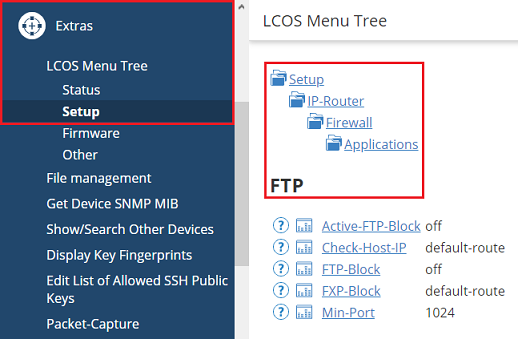
1) Open the menu (Extras) → LCOS Menu Tree → Setup → IP router → Firewall → Applications → FTP.
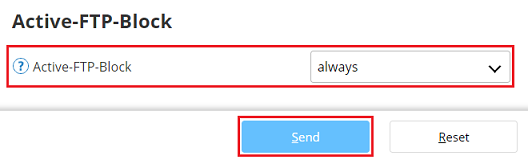
2) Open the parameter Active-FTP-Block, select the the drop-down menu option always and click on Send. This prevents the use of communications via active FTP and only allows the use of passive FTP.
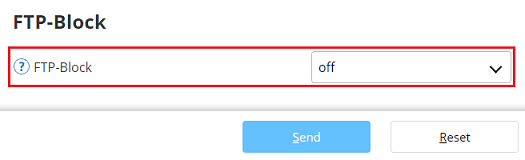
3) Open the parameter FTP-Block and make sure the option is set to off. This means that FTP communication is generally possible.
4) Open the parameter FXP-Block, select the the drop-down menu option always and click on Send. FXP (file exchange protocol) supports both active and passive communication and therefore needs to be blocked (also see Active-FTP-Block).

Deactivating the H.323 ALG:
Via CLI:
Connect to the device CLI via SSH and enter the command set Setup/IP-Router/Firewall/Applications/H.323/H.323-Support no.

With WEBconfig:
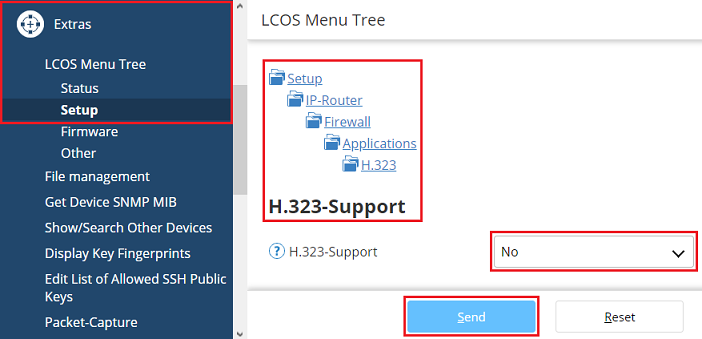
- Open the menu Extras → LCOS Menu Tree → Setup → IP-Router → Firewall → Applications → H.323 → H.323-Support.
- Set the parameter to No and click on Send.
Restricting the IRC ALG:
The IRC ALG cannot be deactivated. However, the behavior can be changed so that the ALG has no port open for incoming communications, as is the case with communication via DCC.
For historical reasons, the name in LCOS is DDC and not DCC.
Although this parameter can also be set via LANconfig or in the configuration tree in WEBconfig, the description there is slightly misleading. LANCOM Systems recommends you carry out the configuration via the console or via the LCOS menu tree in WEBconfig.
Via CLI:
Use SSH to connect to the device command-line interface (CLI) and enter the following command:
set Setup/IP-Router/Firewall/Applications/IRC/IRC-Block off ; set Setup/IP-Router/Firewall/Applications/IRC/DDC-Block always
These parameters are explained in the With WEBconfig section.

With WEBconfig:
1) Open the menu (Extras) → LCOS Menu Tree → Setup → IP router → Firewall → Applications → IRC.
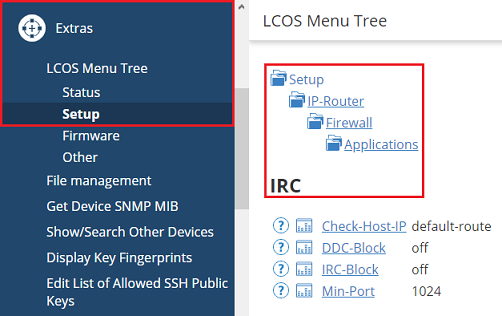
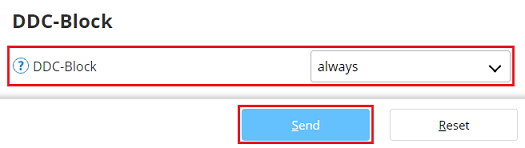
2) Open the parameter DDC-Block, select the the drop-down menu option always and click on Send. This prevents direct communication between two IRC clients via DCC (Direct Client-to-Client).
3) Open the parameter IRC-Block and make sure the option is set to off. This means that IRC communication is generally possible.

Deactivating the SIP-ALG:
With LANconfig:
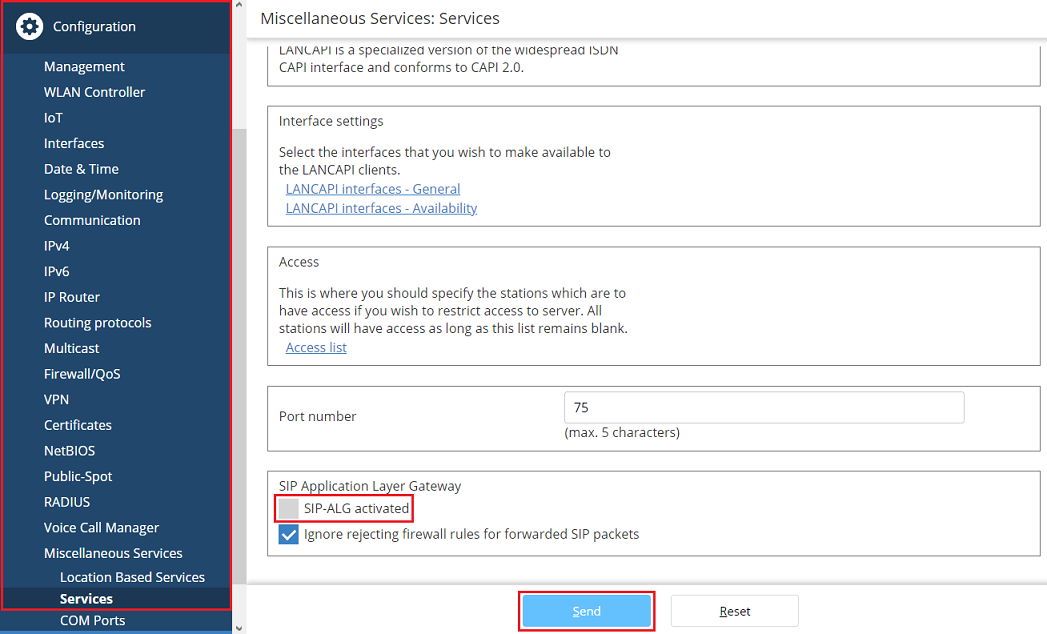
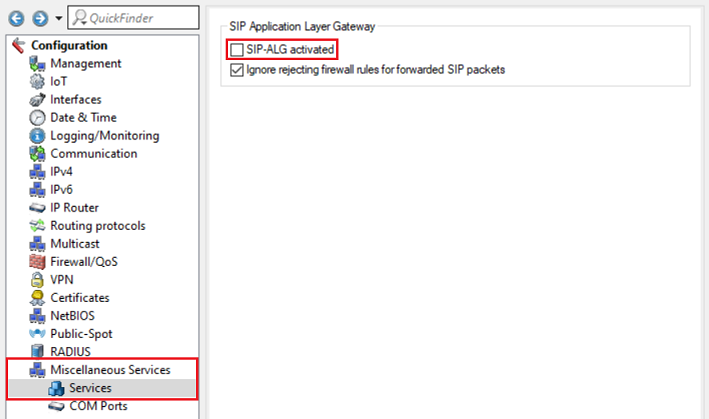
In LANconfig, switch to the menu Miscellaneous Services → Services and make sure that the checkbox for SIP-ALG activated is not checked.
With WEBconfig:
In WEBconfig, switch to the menu Configuration → Miscellaneous Services → Services and make sure that the checkbox for SIP-ALG activated is not checked.