
Description:
There are several default settings and profiles in VPN (e.g. encryption parameters). These are used to set up a VPN connection and allow for an easier configuration by means of prefabricated parameters.
When using IKEv2 the remote site DEFAULT in the Connection list has a special role, as the initial connection establishment is carried out via this remote site. When the VPN connection is recognized (e.g. on the basis of the identities), a switch to the actual VPN remote site occurs.
This article describes how the default settings in VPN can be restored by using an attached script file.
The default profiles must not be deleted or modified. Otherwise it is possible, that the VPN connection cannot be established anymore!
Procedure:
If default settings were deleted, they can be restored by using one of the attached scripts. The script can be imported into the router via LANconfig or via WEBconfig.
LANconfig:
1) Perform a rightclick on the affected router and in the context menu select Configuration Management → Restore Script from File.
As an alternative you can also drag & drop the script file onto the router.
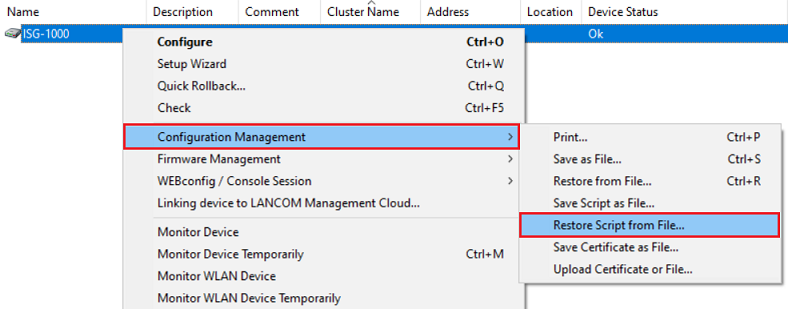
2) Select the suitable script file and click Open.
WEBconfig:
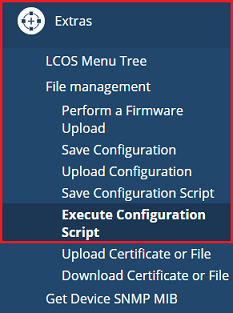
1) Connect to the router via the web browser and go to the menu Extras → File management → Execute Configuration script.
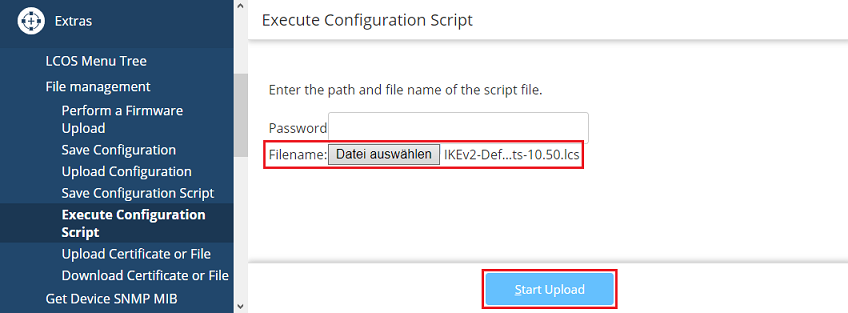
2) Select the suitable script file as Filename and click Start Upload.
IKEv1:
IKEv1 ab LCOS 10.20:
IKEv2:
IKEv2 ab LCOS 10.20:
IKEv2 ab LCOS 10.40:
IKEv2 ab LCOS 10.50:
