
Description:
This document describes how to reset multiple LANCOM Wireless ePaper Displays on the LANCOM Wireless ePaper Server.
- The procedure to perform a bulk import of multiple LANCOM Wireless ePaper Displays into the LANCOM Wireless ePaper Server is described in this Knowledge Base document.
- The procedure to port an existing LANCOM Wireless ePaper Server installation to another system is described in this Knowledge Base document.
The ePaper server was discontinued in January 2024 (End of Sale). Therefore LANCOM Systems will not provide support for new installations of the ePaper server. LANCOM Systems will provide support for existing ePaper server installations up to and including January 2026.
Requirements:
- Installed and licensed LANCOM Wireless ePaper Server for Windows as of version 1.40 (download latest version)
- Installed cURL for Windows (download)
- A useful extra is a barcode scanner so that you can quickly read and digitize the individual Display IDs.
Procedure:
1) Use the ready-made XML file shown below for resetting multiple Displays simultaneously.

2) Open the XML file in a text editor. The unlock codes of all of the Displays must be entered into this list.
The unlock code of each Display is given in alphanumeric form and as a barcode on the insert supplied with the product.
A barcode scanner helps you to conveniently scan the unlock codes for the XML file.
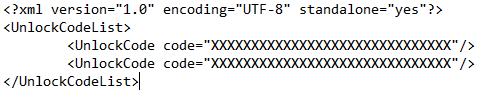
3) Save the XML file when it contains all of the unlock codes of the Displays.
4) Open the command line and enter the following command:
curl -X POST -d @ <file-name>.xml --header "Content-Type:application/xml" http:// <server-ip> :8001/service/label/unlock -v
Replace <file-name>.xml with the name of the XML file and <server-ip> with the IP address of the LANCOM Wireless ePaper Server.
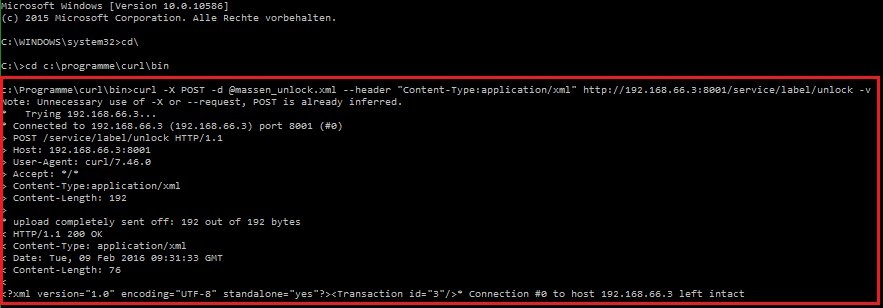
5) The process is now concluded.
