
Description:
To prevent an attacker from setting up a DHCP server (Rogue DHCP) in the network and assign IP parameters, the function DHCP Snooping can be configured on a managed switch. In doing so "DHCP Offer" packets are only transmitted on the switch port, the DHCP server is connected to. "DHCP Offer" packets on all other ports are discarded. Furthermore, "DHCP Discover" as well as "DHCP Request" packets from a network device are only forwarded to a "Trusted" port, but not to "Untrusted" ports. This significantly lessens the amount of Broadcast packets in the network, which is especially useful in bigger scenarios.
This article describes how to configure DHCP Snooping on a GS-24xx / GS-3xxx / XS-3xxx series switch.
By using DHCP Snooping the switch has to inspect all DHCP packets. This leads to an increased CPU load.
Requirements:
- LCOS SX as of version 4.00 (download latest version)
- Any web browser for accessing the webinterface
- Configured and functional network including VLAN
Procedure:
1) Connect to the switch via the web browser and go to the menu DHCP → DHCPv4 → Snooping → Configuration.
In LCOS SX 4.00 you can find the DHCP snooping settings for IPv4 in the menu DHCP → Snooping → Configuration.

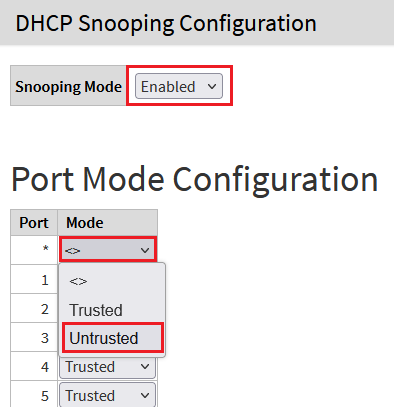
2) Set the Snooping Mode to Enabled and in the dropdown menu for the Port * select the option Untrusted so that all ports are set to Untrusted.
Only the Port, where the DHCP server is connected has to be set to Trusted. The remaining ports have to be set to Untrusted. As the default setting is Trusted for all ports, all ports have to be set to Untrusted first.
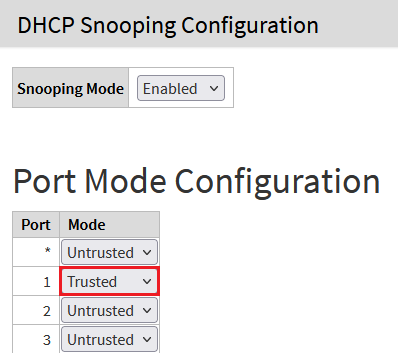
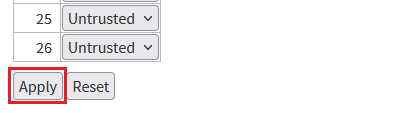
3) Select the option Trusted for the Port, where the DHCP server is connected. In doing so "DHCP Offer" packets are only transmitted via this port. Click Apply afterwards.
If the DHCP server is connected via LACP, the option Trusted has to be selected on all LACP ports.
4) With the configuration complete, click on the red disk symbol in the upper right corner to save the configuration as the start configuration.
The start configuration is retained even if the device is restarted or there is a power failure.

