
Description:
This article describes how an LMC trace can be created on a switch with LCOS SX 4.xx and 5.xx. An LMC trace is required when problems with the LMC arise (e.g. connection problems).
Requirements:
- One of the following LANCOM switch models:
- GS-24xx
- GS-3xxx
- XS-3xxx
- XS-51xx / XS-6128QF
- GS-45xx / XS-45xx
- CS-8132F
- YS-7154CF
- LCOS SX as of version 4.00 RU2 on GS-3xxx switches (download latest version)
- LCOS SX as of version 4.30 on GS-24xx / XS-3xxx switches (download latest version)
- LCOS SX as of version 5.00 for XS-51xx / XS-6128QF (download latest version)
- LCOS SX as of version 5.20 for GS-45xx / XS-45xx (download latest version)
- LCOS SX as of version 5.30 for CS-8132F and YS-7154CF (download latest version)
- SSH client for accessing the CLI (e.g. PuTTY)
Procedure:
The traces are the same on all switch series.
1) Connect to the switch via the CLI and enter the trace command in the format lmc trace <Trace>.
In most cases all LMC traces are required. Therefore enter the command lmc trace all .

The command lmc trace ? shows all possible LMC traces.
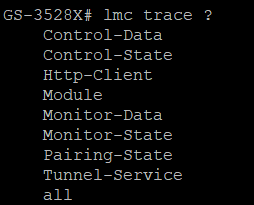
2) Save the trace output in a text file.
3) Contact LANCOM Support and include the following information:
- Switch model and used firmware version
- Configuration backup of the device
- Exact description of the error
- LMC trace in a text file
