Description:
This article describes how to read out debug information on GS-23xx series switches.
In order for the correct time to be shown in the Bootlog and Eventlog entries, the time must be set on the switch. To accomplish this, time synchronization via NTP should be configured in the webinterface of the switch in the menu System → Time.
Requirement:
- SSH client, e.g. PuTTY
Procedure:
Logging in to the switch:
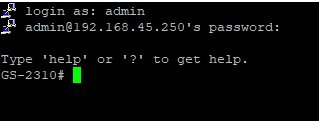
Connect to the switch via SSH and log in with admin rights.
Instead of using SSH, you can also connect via a serial console cable as supplied with the switch.
The required parameters can be found in this Knowledge Base article.
Reading out system information:
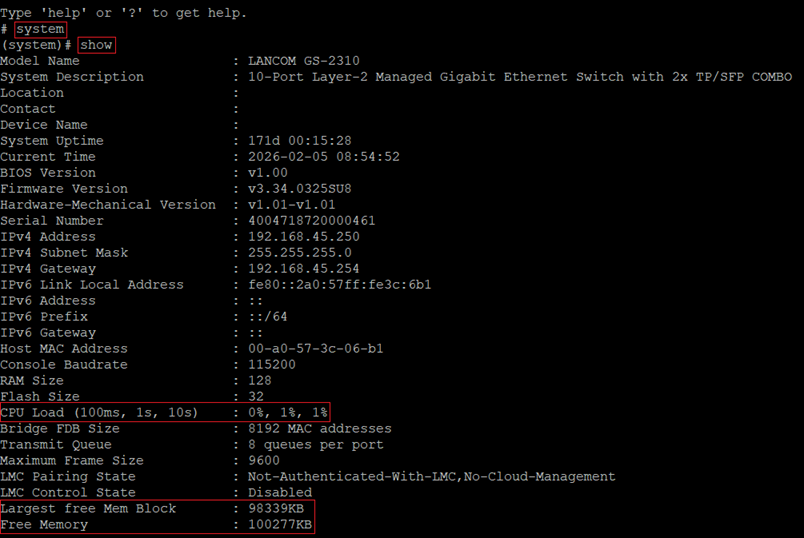
Enter the command system followed by the command show to read out the system information. Among other things, it contains information regarding the CPU load as well as the free memory.
The command exit can be used to return to the root level.
Reading out the Bootlog:
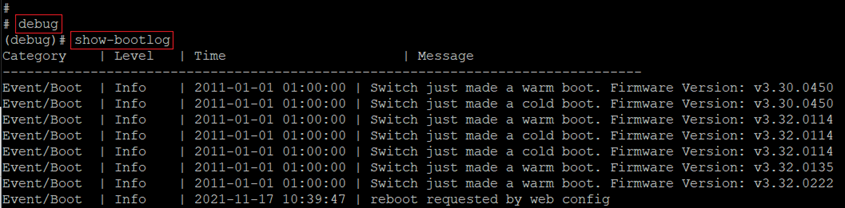
Enter the command debug followed by the command show-bootlog to read out the Bootlog.
The command exit can be used to return to the root level. If you want to execute additional commands at the debug level, you do not have to switch to the root level.
Reading out the Eventlog:
Enter the command debug followed by the command show-eventlog to read out the Eventlog.
The command exit can be used to return to the root level. If you want to execute additional commands at the debug level, you do not have to switch to the root level.

Reading out memory information:
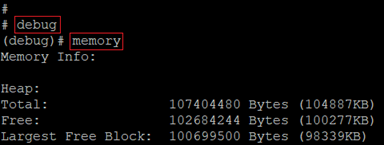
Enter the command debug followed by the command memory to read out detailed information regarding the memory.
The command exit can be used to return to the root level. If you want to execute additional commands at the debug level, you do not have to switch to the root level.