Description:
To use the ThinAP2.0 protocol, the LANCOM ePaper access points must operate at least LCOS as of version 10.30. ePaper access points with LCOS LX only support ThinAP2.0.
If a firewall is operated between the ePaper server and the ePaper access point (e.g. the Windows Firewall), communication via the TCP ports 7353 or 7354 has to be allowed, as otherwise the firewall will block ePaper communication.
The ePaper server was discontinued in January 2024 (End of Sale). Therefore LANCOM Systems will not provide support for new installations of the ePaper server. LANCOM Systems will provide support for existing ePaper server installations up to and including January 2026.
- Installed and licensed LANCOM Wireless ePaper Server as of version 1.91 (download latest version)
- LCOS as of version 10.30 or LCOS LX as of version 6.10 on the LANCOM ePaper access points ( download latest version)
- LANCOM Wireless ePaper USB
- Installed cURL for Windows (download) or Linux
The commands also work with Linux.
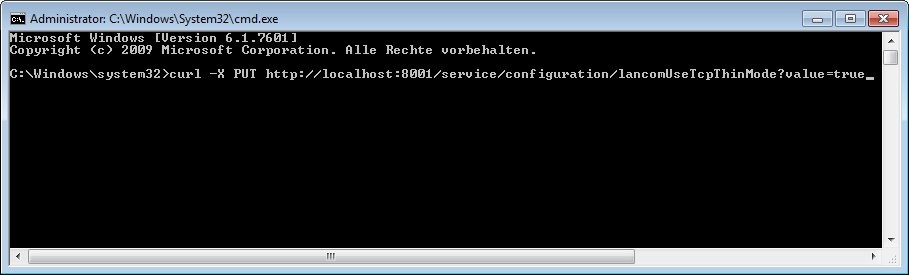
Optionally, as of LCOS 10.42 the communication between ePaper access point and ePaper server can be encrypted with TLS .
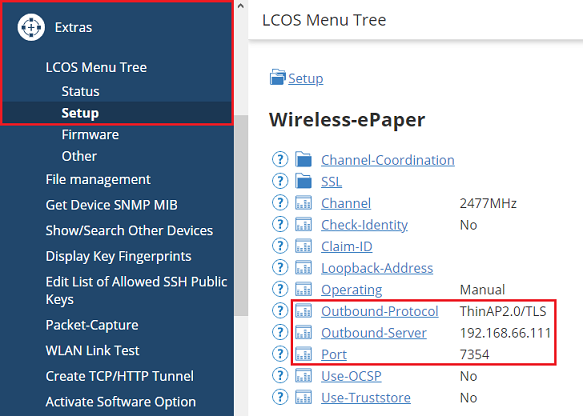
Connect to the ePaper access point via a web browser, go to the menu Extras → LCOS Menu Tree → Setup → Wireless-ePaper and modify the following parameters:
- Outbound-Protocol: Select the option ThinAP2.0/TLS.
- Outbound-Server: Enter the IP address of the ePaper server.
- Port: Enter the port 7354.