Description:
With application filters, you can filter network traffic according to the way that the data stream behaves. In this way, parts of an application - such as the chat feature in Skype - can be systematically filtered out, even if they are encrypted.
This document describes the steps you need to take to configure the Application Filter in a LANCOM R&S®Unified Firewall.
In some cases, for example with Skype, the application filter can only classify applications after a certain number of packets have been exchanged. This means that there is no way to prevent the initial contact. However, all subsequent packets are then blocked.
The Application Filter does not require a proxy. It analyzes all traffic that passes through the firewall, regardless of which port is used.
Requirements:
- LANCOM R&S®Unified Firewall with firmware as of version 10 and an activated full license
- A configured and functional Internet connection on the Unified Firewall
- Functional packet filter on the Unified Firewall
- Web browser for configuring the Unified Firewall
The following browsers are supported:- Google Chrome
- Chromium
- Mozilla Firefox
Procedure:
1) Activating the Application Filter:
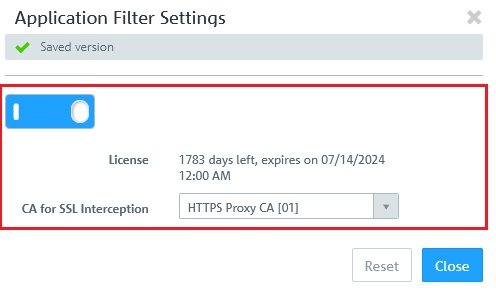
1.1) Activate the Application Filter in the menu UTM → Application Filter → Settings.
In the drop-down menu CA for SSL interception, the default setting is the available HTTPS proxy CA.
This setting is required for the optional SSL inspection in the Application Filter profile (see step 2.1).
2) Application Filter profiles 2.1) Open the menu UTM → Application Filter → Profile. Here you can create your own profiles by clicking the “+” button. Use the Application Filter profile settings to configure the following options:
- Profile name:
Enter a name for the Application Filter profile.
- SSL interception:
SSL interception allows R&S®Unified Firewalls to analyze incoming data traffic routed through SSL-encrypted connections and to apply the configured Application Filter profile to it.
- Rules:
Select the protocols and applications you want to add to the profile. The protocols and applications are listed by category in the table. Use the "Filter" input field to filter the list of protocols and applications and display only the entries that match your search input.- Click “+” to show the unfiltered list of protocols and applications.
- Click on the > button next to a category to view the protocols and applications that it contains, along with a brief description.
- You can select entire categories or individual protocols or applications by placing a checkmark in the appropriate box. Uncheck the box next to a category, protocol, or application to remove it from the Application Filter profile. To hide protocols and applications, click the button Ú next to the category.
The Application Filter with SSL interception is not applied to traffic passing through the transparent proxy (see step 1.2 in this Knowledge Base article ).
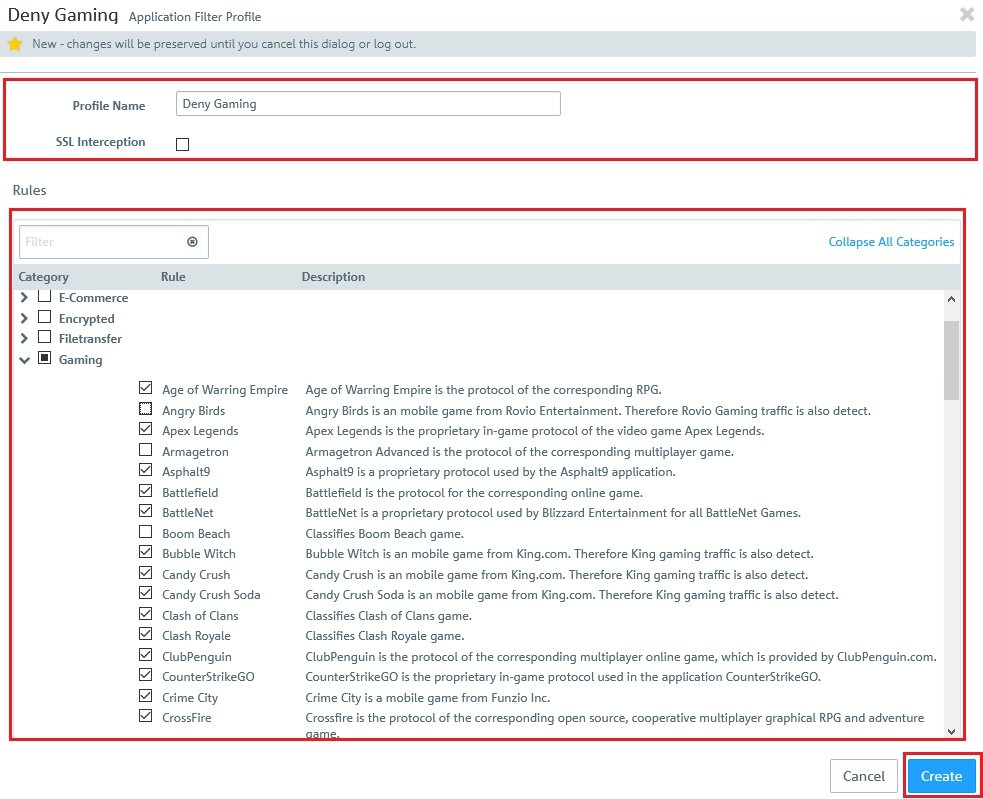
2.2) Click on Create to save the Application Filter profile.
3) Using Application Filter profiles in the firewall configuration:
This configuration example shows how to explicitly prohibit the use of certain applications. This makes use of a blacklist of prohibited applications.
3.1) In the LAN network object, click the “Connection” icon and then click the Internet object that was created for the existing WAN connection.
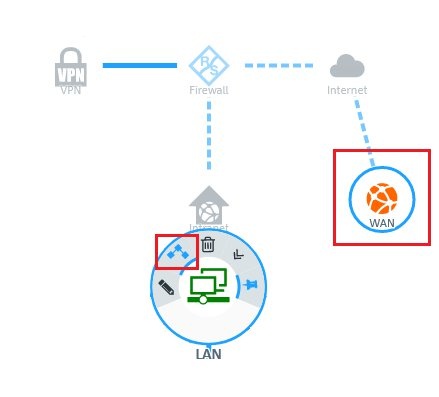
3.2) Switch to the Application Filter tab in the following dialog.
3.3) This example relies on a list of prohibited applications, so the Mode is set to Blacklist.
3.4) Add the Application Filter profiles to be used for the blacklist by clicking on “+” for each one.
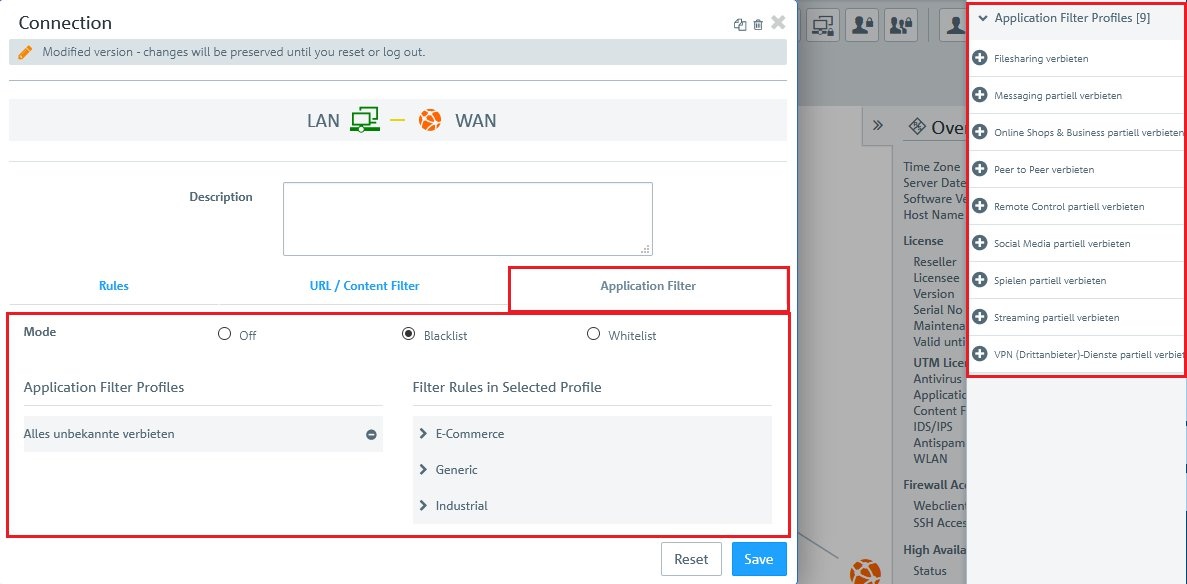
3.5) Click on the Save button to accept your configuration.
3.6) Implement the configuration changes in the Unified Firewall by clicking Activate.