
Information:
The LANCOM R&S®Unified Firewall checks the license expiry dates in the license file at regular intervals. If a license expires or the trial period ends, several functions will be deactivated until you upload a new license via the web client.
Regardless of the configured end-of-license behavior, the configuration cannot be modified in the user interface when the license expires. Although it is still possible to inspect the configuration.
- After a basic license has expired, the configured features (e.g. packet filter, VPN connections) continue to function without restrictions.
- After a full license has expired, the configured basic features (e.g. packet filter, VPN connections) also continue to work without restrictions, but configured UTM features (e.g. Content Filter and IDS/IPS) become inoperative.
Choosing the End-of-License Behaviour of a LANCOM R&S®Unified Firewall:
After the license has expired, web and e-mail traffic is either blocked or forwarded unfiltered through the LANCOM R&S®Unified Firewall. In the first case you can see immediately that you have to use a new license when your current license data has expired.
1) Choosing the End-of-License Behaviour when using LCOS FX as of version 10.2 up to and including version 10.5 RU1:
You can configure the end-of-license behavior in the menu Firewall → License anytime. The default setting is Redirect web access to an error page. Block mails if the mail proxy is enabled.

If you operate the system in an unsafe mode after the license expires, you will only be notified on the user interface of the LANCOM R&S®Unified Firewall.
2) Choosing the End-of-License Behaviour when using LCOS FX as of version 10.5 RU2:
The End-of-License Behaviour has to be chosen after the installation of the firewall or when uploading a license.
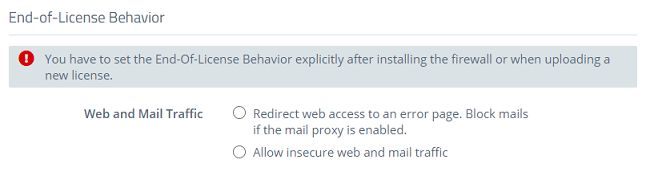
Warning messages before license expiry of a LANCOM R&S®Unified Firewall:
1) Warning messages before license expiry from LCOS FX 10.2 up to and including 10.5 RU1:
The license information in the notification area of the web client appears in red as soon as the period until the license expires is less than 30 days.
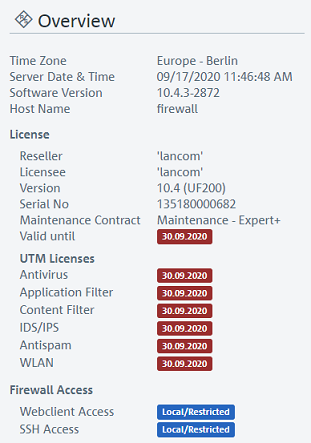
2) Warning messages before license expiry as of LCOS FX 10.5 RU2:
The license information in the notification area of the web client appears in red as soon as the period until the license expires is less than 30 days.
30 days before the license expires a popup notification is displayed after the login.
If you close the popup it is displayed again after the next login.
As an alternative you can also set up a reminder for the next day or in 5 days by clicking on the "gear symbol". It is also possible to remove the popup by clicking Acknowledge.
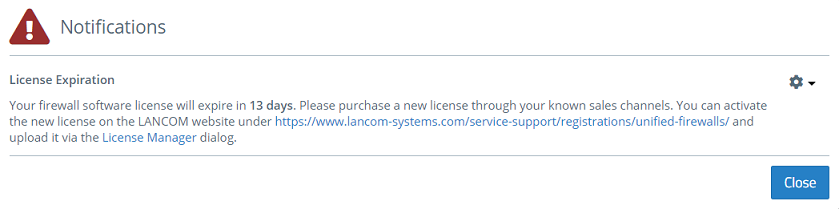
There is also banner message displayed in the upper area 30 days before the license expires.

