
Description:
LLDP-MED (Link Layer Discovery Protocol - Media Endpoint Devices) is an extension of the LLDP protocol that supports the interoperability of VoIP terminals and other devices on the network, such as a PC.
Requirements:
- LANCOM switch of the GS-23xx series with LCOS SX as of 3.32 Rel (download latest version)
- IP telephone supporting LLDP-MED
- Any web browser for accessing the webinterface
- The VoIP telephone has to be configured to tag packets with the Voice VLAN ID (active tagging)
- In this example, the Voice VLAN has the ID 200, and LLDP is to be used as the discovery protocol.
- The IP telephone should be assigned this VLAN ID automatically as soon as it is connected to the designated switch port.

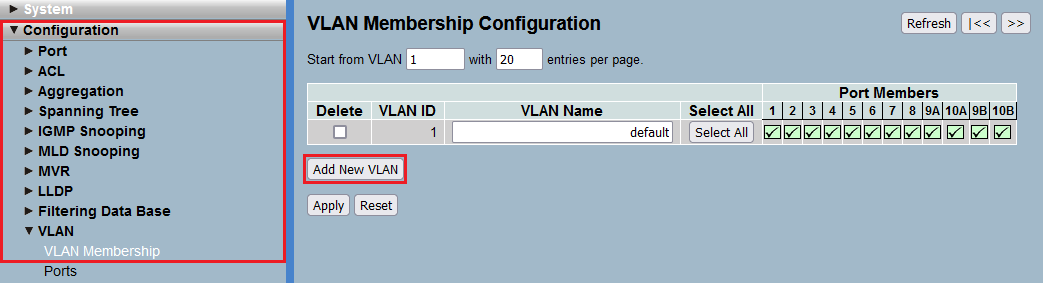
- VLAN ID: Enter the VLAN ID of the Voice VLAN (in this example the VLAN ID 200).
- VLAN Name: Enter a descriptive name for the Voice VLAN (in this example Voice).
- Port Members: Select the Port, the router is connected to (in this example Port 8).


5) Switch to the menu Configuration → LLDP → LLDP-MED-Configuration.

6) Under Policies click on the button Add new policy.

7) For the Policy modify the following parameters and click Apply:
- Application Type: In the dropdown menu select the option Voice.
- Tag: In the dropdown menu select the option Tagged.
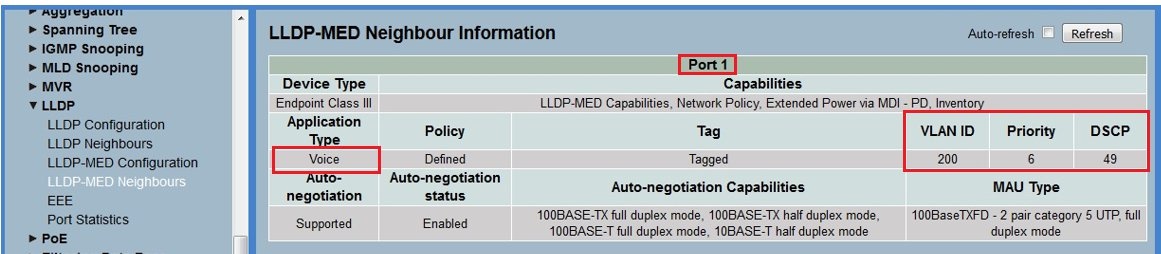
- VLAN ID: Enter the VLAN ID of the Voice VLAN (in this example the VLAN ID 200).
- L2 Priority: Enter the value 6.
- DSCP: Enter the value 49.

8) In the Policy Port Configuration select the Policy created in step 7) for the Port, the VoIP telephone is connected to (in this example Port 1). Click Apply afterwards.


- Mode: In the dropdown menu select the option Enabled to activate the Voice VLAN.
- VLAN ID: Enter the VLAN ID of the Voice VLAN (in this example the VLAN ID 200).

- Mode: In the dropdown menu select the option Auto.
- Discovery Protocol: In the dropdown menu select the option LLDP.
With the mode "Auto" the MAC addresses of connected network devices are learned statically for a port. The mode "Auto" may therefore only be used for a port, a VoIP telephone is directly connected to. If an access point is connected to a port with this mode, this can cause roaming problems, among other things!
If no VoIP telephone is connected to a port, the mode "Disabled" should be used. If a VoIP telephone is connected indirectly to a port (e.g. via an access point), the mode "Forced" has to be used. With the mode "Forced" the MAC addresses of network participants are learned dynamically.


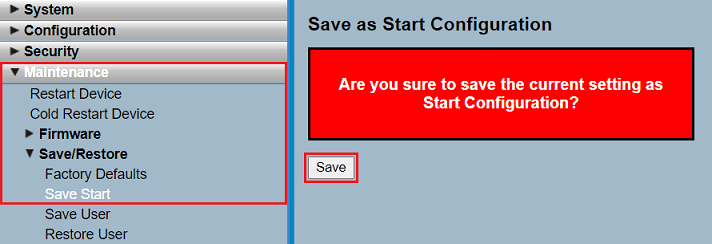
The Start Configuration is saved boot persistent in the device. Thus the configuration is also available after a reboot or a power outage.
Function check:
- Port 3 must be a member of the VLAN with the ID 200.
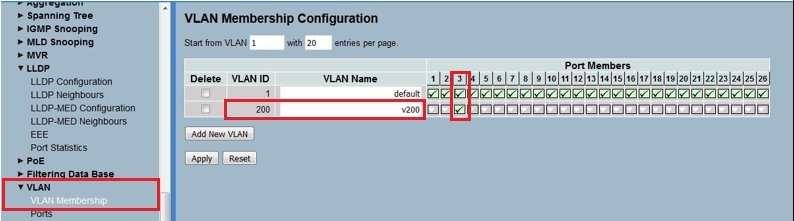
- In the VLAN port configuration, port 3 needs to be set with the PVID 200.
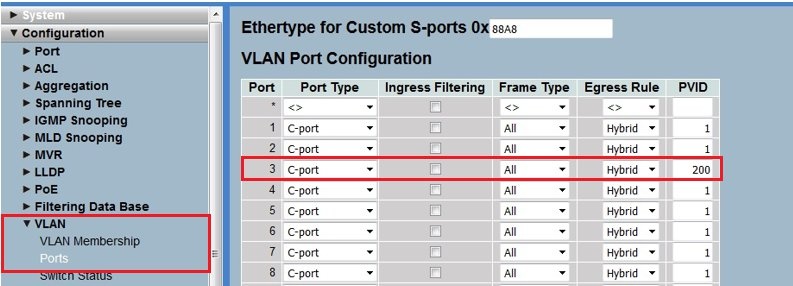
- Save the configuration to the switch. You should now be able to send a ping from the PC connected to port 3 to the IP telephone connected to port 1.
