

Description:
API keys are essential for authenticating requests made to your API. They help ensure that only authorized users and applications can access your project's resources. This article provides a step-by-step guide on how to enable API keys for your project.
Prerequisites:
Before you begin, ensure that you have:
- An active account in the LMC
- A project created in the LMC
- Administrative access to the project settings
Steps to Enable API Keys:
Step 1: Log In to Your Account
- Navigate to the LMC website on https://cloud.lancom.de.
- Click on the Login button.
- Enter your credentials and access your project dashboard.
Step 2: Select Your Project
- From the dashboard, choose the right Projects using the Account Menu.
- Choose the project for which you want to enable API keys.
Step 3: Access Project Settings and Enable API Keys
- In the project menu on the left, click on the "Project specifications" section.
- Within the project settings, open the section labeled "Basic".
- Activate the option "Allow access via API keys for this project" to enable API keys.
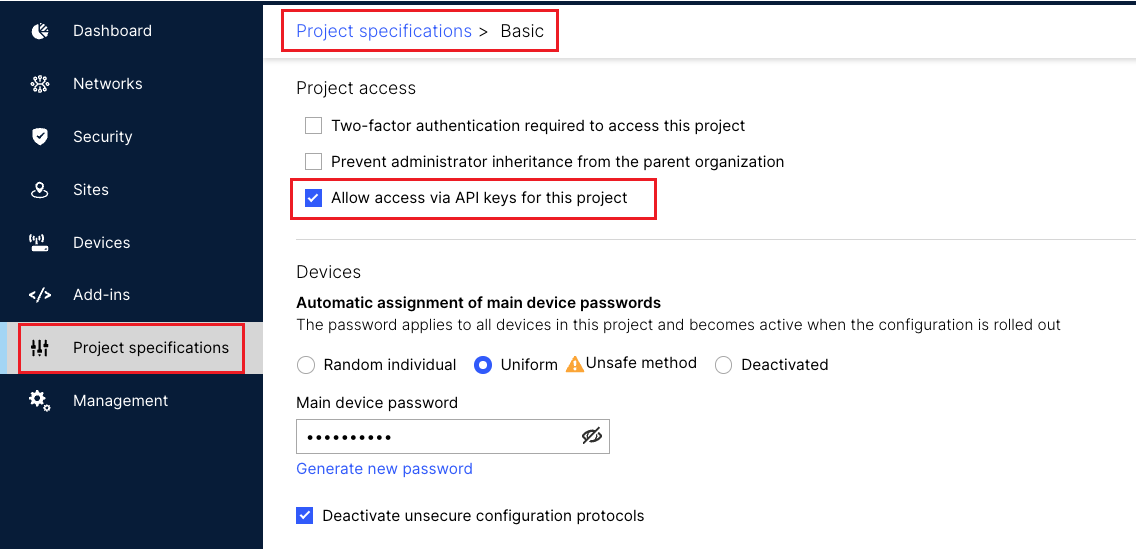
You can now create API Keys for this project in your Profile section. For more information, please see Getting Started Guide.
Conclusion:
By following the steps outlined in this article, you can successfully activate and manage API keys for your project.
For further assistance, please open the Getting Started Guide or contact the LANCOM support.
