Description:
In some scenarios it is useful to limit the bandwith of WiFi devices in the WLAN, so that it can be divided evenly to all WLAN participants . On LANCOM access points with LCOS and on a WLAN Controller it is possible to limit the bandwith via the parameters Client TX bandwith limit and Client TX bandwith limit. It should be noted, that these values are valid from the point of view of the access point. From the view of the WiFi device it's the other way around.
This article describes how to limit the bandwith for individual end devices within an SSID.
On a stand alone access point this feature is supported as of LCOS 9.10.
On a WLAN Controller this feature is supported as of LCOS 10.40. The parameters can only be rolled out to the access points if these also use a firmware as of LCOS 10.40.
Requirements:
Stand alone access point:
- LCOS as of version 9.10 (download latest version)
- LANtools as of version 9.10 (download latest version)
- Configured and functional WLAN
WLAN Controller scenario:
- LCOS as of version 10.40 on the access point and the WLAN Controller (download latest version)
- LANtools as of version 10.40 (download latest version)
- Configured and functional WLAN
Procedure:
Stand alone access point:
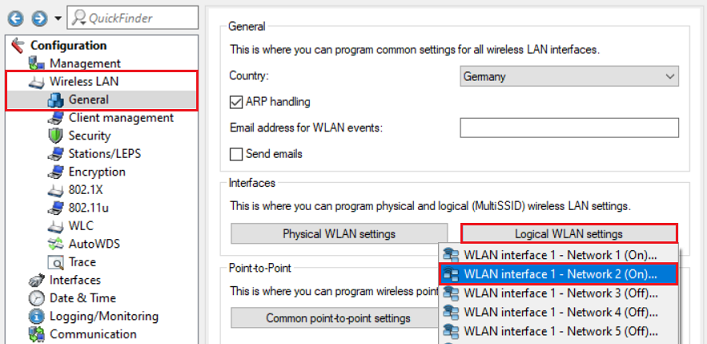
1) Open the configuration of the access point in LANconfig, go to the menu Wireless LAN → General → Logical WLAN settings and select the WLAN interface the bandwith should be limited for, deren Bandbreite für einzelne Endgeräte limitiert werden soll (in diesem Beispiel WLAN-Interface 1 - Netzwerk 2).
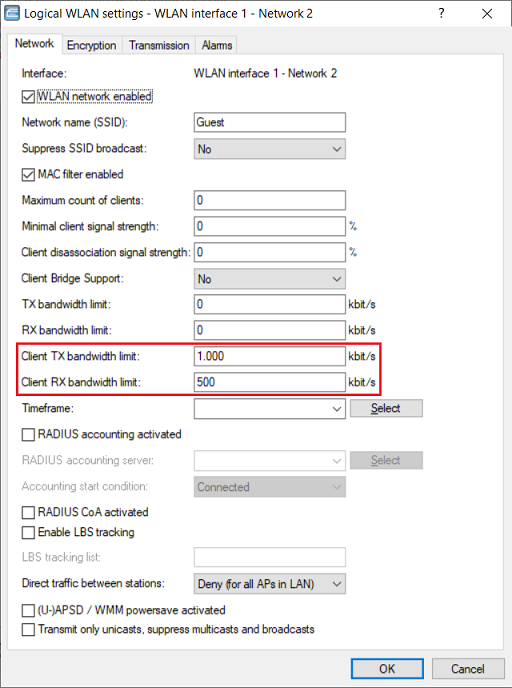
2. Passen Sie die folgenden Parameter an:
- Client TX Bandbr.-Begrenzung: Dieser Wert repräsentiert aus Sicht des Endgerätes die erlaubte Downloadrate. Geben Sie die gewünschte maximale Downloadrate für ein Endgerät an (in diesem Beispiel 1000 kbit/s).
- Client RX Bandbr.-Begrenzung: Dieser Wert repräsentiert aus Sicht des Endgerätes die erlaubte Uploadrate. Geben Sie die gewünschte maximale Uploadrate für ein Endgerät an (in diesem Beispiel 500 kbit/s).
3. Wiederholen Sie die Schritte 1. und 2. gegebenenfalls für weitere Access Points.
WLAN-Controller Szenario:
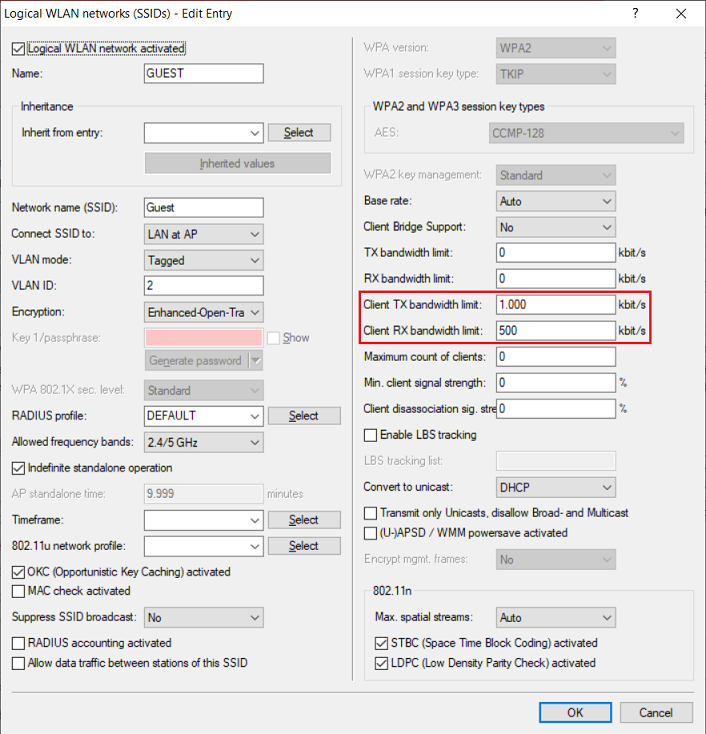
1. Öffnen Sie die Konfiguration des WLAN-Controllers in LANconfig und wechseln in das Menü WLAN-Controller → Profile → Logische WLAN-Netzwerke (SSIDs).

2. Markieren Sie das logische WLAN-Profil dessen Bandbreite für einzelne Endgeräte eingeschränkt werden soll und klicken auf Bearbeiten (in diesem Beispiel das Profil GAST).

3. Passen Sie die folgenden Parameter an:
- Client TX Bandbr.-Begrenzung: Dieser Wert repräsentiert aus Sicht des Endgerätes die erlaubte Downloadrate. Geben Sie die gewünschte maximale Downloadrate für ein Endgerät an (in diesem Beispiel 1000 kbit/s).
- Client RX Bandbr.-Begrenzung: Dieser Wert repräsentiert aus Sicht des Endgerätes die erlaubte Uploadrate. Geben Sie die gewünschte maximale Uploadrate für ein Endgerät an (in diesem Beispiel 500 kbit/s).