
Description:
By default, the status of a managed device is always checked when LANconfig is started. If only a few devices are managed via LANconfig, this check is completed in a relatively short time after starting the software and LANconfig can be used.
If many devices are managed via LANconfig, the check process can take some time (1 minute or more, depending on the number of devices to be checked). During the check, LANconfig cannot be used for other tasks.
This document describes how to disable the device status check for a single device as well as for several devices at the same time in order to be able to use LANconfig for configuring the devices without any time delay.
Requirements:
- LANconfig as of version 9 (download)
- Optional: Text editor for editing the "lanconf.ini" file
Procedures:
1. Deactivate checking of the device status for a single device:
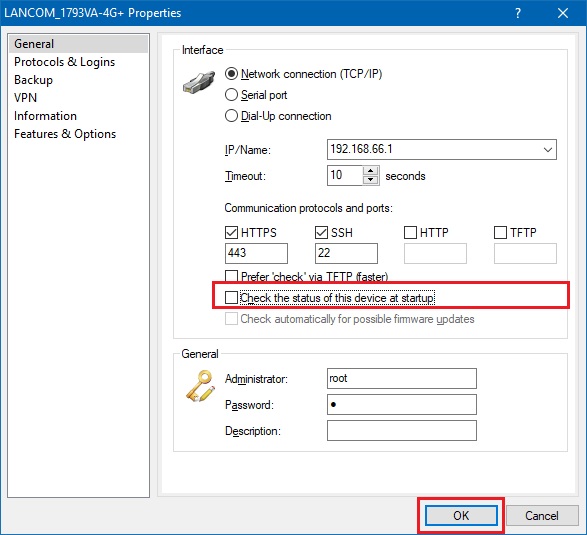
1.1 Right-click on the respective device and select Properties.
1.2 Deactivate the option Check the status of this device at startup.
1.3 Click OK.
2. Deactivate checking of the device status for several devices at the same time:
2.1 Mark the devices for which you want to deactivate the check in the device list.
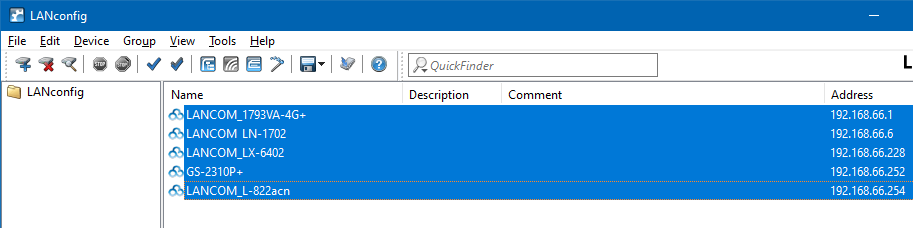
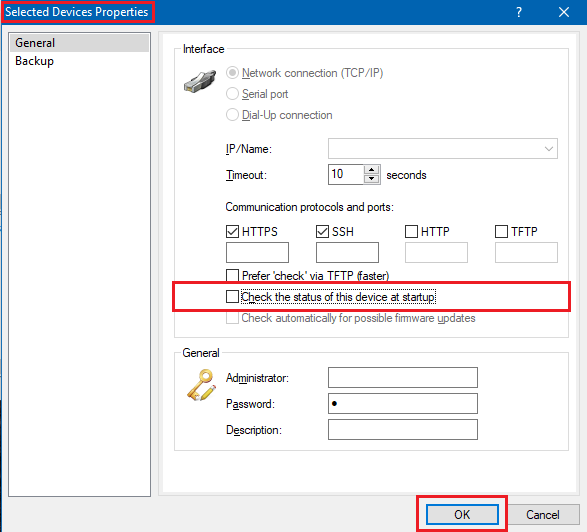
2.2 Right-click on the selected devices and select Properties.
2.3 Uncheck Check the status of this device at startup.
2.4 Click OK.
As an alternative to editing in LANconfig, you can set the "Parameters" option in the "lanconf.ini" file from the default value of 1 to the value 0 for each device.
Make sure that the entries after the value are retained!

