Description:
To gain access to the mobile network, a SIM card is needed. For easier handling it is possible to use a digital SIM card - a so-called eSIM. For this purpose, the mobile device must have an eSIM chip, which is used to store the eSIM profiles. Additionally, the provider must support the eSIM functionality.
This article describes, how an eSIM profile can be downloaded on a mobile router and how it can be used afterwards.
Compatibility list of mobile routers with eSIM support:
| Router | as of Hardware Release | Cellular modem |
|---|---|---|
| 1800EF-4G | D | Quectel EM60K-EA |
| 1800EF-5G | D | Quectel RM520N-GL |
| 1800EFW-5G | all | Quectel RM520N-GL |
| 1800VA-4G | D | Quectel EM60K-EA |
| 1800VA-5G | D | Quectel RM520N-GL |
| 1800VAW-4G | D | Quectel EM60K-EA |
| 1803VA-4G | D | Quectel EM60K-EA |
| 1803VA-5G | D | Quectel RM520N-GL |
| 1803VAW-5G | all | Quectel RM520N-GL |
| 1930EF-5G | all | Quectel RM520N-GL |
| 1936VAG-5G | all | Quectel RM520N-GL |
| OAP-5G | all | Quectel RM520N-GL |
Routers, which are not listed or routers with deviating Hardware-Releases do not support the eSIM functionality.
Please always consult the datasheet of the device to make sure, that it supports the eSIM functionality.
Requirements:
- Mobile router with eSIM chip (see compatibility list in the Description)
- LCOS as of version 10.94 (download latest version)
- LANtools as of version 10.94 (download latest version)
- Any web browser for accessing the device via WEBconfig
Procedure:
1) Downloading the eSIM profile from the mobile provider:
Due to technical reasons, the eSIM profile cannot be downloaded via the mobile connection, but instead must be downloaded via an existing DSL, Cable/Ethernet or fiber connection.
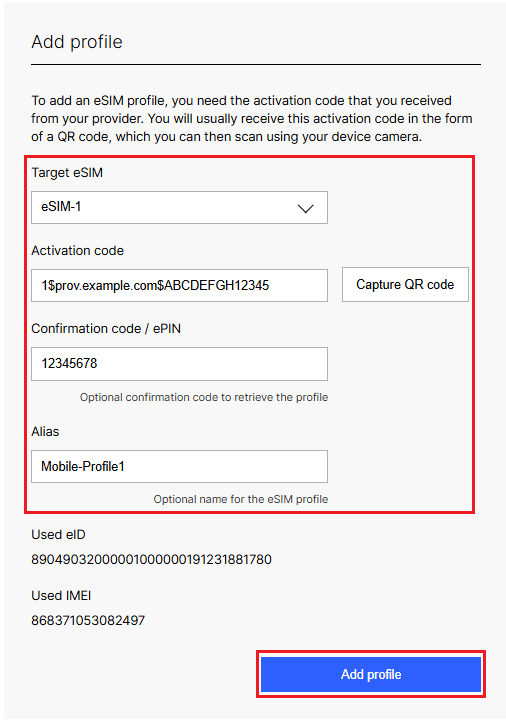
1.1) Connect to the router via WEBconfig and go to the menu Setup Wizards → eSIM Management.


1.2) Modify the following parameters and click Add profile:
- Target eSIM: Select the desired eSIM, the profile should be added to (e.g. eSIM-1).
- Activation code: Enter the activation code you received from your provider (in this example 1$prov.example.com$ABCDEFGH12345). As an alternative, the activation code can also be entered by scanning a QR code, if the computer / laptop has a camera.
- Confiirmation code / ePIN: If you received an additional confirmation code (ePIN for Vodafone) by your provider, it must be entered here.
- Alias: Optionally you can enter an alternative name. It allows easier identification of the profile in the eSIM Management (under Available profiles).
It is possible to save up to eight eSIM profiles on the integrated eSIM chip.
2) Further steps: Configuring the mobile connection via the Setup Wizard:
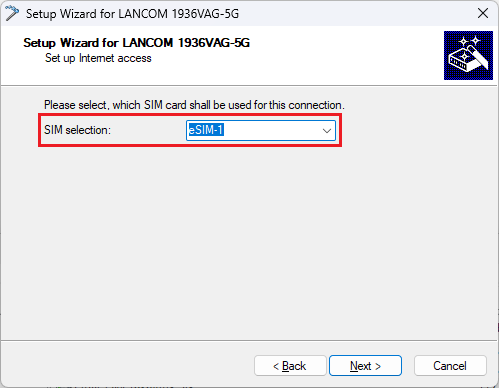
Set up the mobile connection as usual via the Setup Wizard Set up Internet access.
In the SIM selection select the option eSIM-1 from the dropdown menu. In doing so, the currently active eSIM profile is used.