
Description:
This document explains how to align antennas for P2P mode by using the 'Adjusting point-to-point WLAN antennas…" program in LANmonitor.
Requirements:
Procedure:
The precise alignment of the antennas is of considerable importance in establishing a P2P path. The more central the receiving antenna is located in the "ideal line" of the transmitting antenna, the higher is the actual power and the effective bandwidth. If the receiving antenna is outside of this ideal area, however, significant losses in performance will be the result.
Two methods are available to ensure the best possible alignment of the antennas:
- In LANmonitor the real-time signal strength over the P2P connection is displayed.
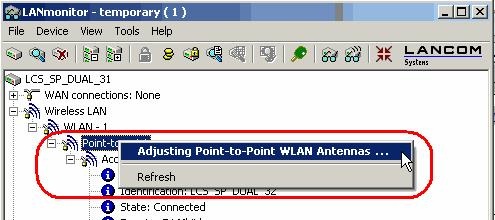
- Right-clicking with the mouse on 'Point-to-point' in the LANmonitor context menu activates the option 'Adjusting Point-to-Point WLAN Antennas...'. A new window opens up that displays the signal strength of the link.
Notice:
The 'Point-to-point' entry is only visible in LANmonitor if the monitored device has at least one base station defined as a remote station for a P2P connection (LANconfig: Wireless LAN -> General -> Physical WLAN settings -> Point-to-Point).
In the dialog for setting up point-to-point connections, LANmonitor prompts for the information required to establish the P2P connection:
- Assuming that the P2P path is configured at both ends, i.e. the two remote base stations are entered with their respective MAC addresses; has the point-to-point operating mode been activated?
- Which access point is to be monitored? All of the base stations defined as P2P remote stations in the device concerned can be selected here.
- Are both antennas approximately aligned? The basic P2P connection has to be working before fine-tuning can be performed with the aid of LANmonitor.


Once signal monitoring has commenced, the P2P dialog displays the absolute values for the current signal strength and the maximum value since starting the measurement. The development of the signal strength over time and the maximum value are displayed in a diagram, too.
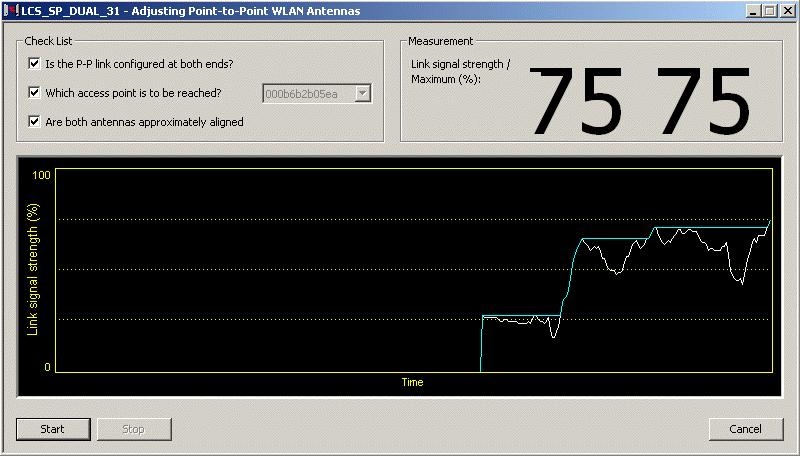
Now align one antenna after the other until the maximum signal strength is achieved for each one.
