
Description:
LCOScap via the command line is more efficient than in WebConfig, thus the chance that packages can not be recorded is lower.
LCOSCAP requires significantly fewer resources than a trace using the LCOS internal 'trace' command, because the packets are not analyzed any further, but simply written to the *.pcap file.
Requirement:
- LCOSCAP (download latest version)
- LCOS as of version 8.60 (download latest version)
- IP connectivity between the Windows PC running LCOSCAP and the LANCOM router being investigated
As of LCOS 10.40 also LCOSCap as of version 10.40 has to be used as Administrator passwords are encrypted as of LCOS 10.40 and saved as a hash .
Procedure:
- Logical Network interfaces: LAN-x
- Logical DSL interfaces: DSL-x
- Integrated VDSL modem:
- 17xx: LL-VDSL
- 19x6: LL-XDSL-1 and LL-XDSL-2
- LACP: BUNDLE-x
The interfaces LL-VDSL-CTRL or LL-XDSL-x-CTRL must not be used as they only record management frames of the DSL modem.
1.3) Click on Go to start the packet capture.

2. Command prompt:
2.1 Open an SSH session on your LANCOM Router and type the following command to activate the package capturing on the device:
set /Setup/Packet-Capture/LCOSCap-Operating yes

As of LCOS 10.50 the Main device password is saved only as a hash instead of cleartext when performing an initial configuration or resetting the device to factory state (Setup/Config/Passwords/Keep-Cleartext No). Existing configurations are not affected.
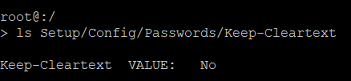
Currently the tool LCOSCap doesn't work without a cleartext password. As a workaround the LCOSCap Algorithm Simple can be removed. For this purpose execute the following CLI command:
set Setup/Packet-Capture/LCOSCap-Algorithms 12



