

Introduction to Swagger Clients
Swagger, now known as OpenAPI, is a powerful Interface Description Language designed for describing RESTful APIs using JSON. It provides a standardized way to document and interact with APIs, making it easier for developers to understand and utilize web services.
The LMC API leverages Swagger/OpenAPI to clearly specify and document its API interface. You can access the Swagger index.json for the API of the particular service using the following link: https://cloud.lancom.de/<microservice>/api-docs/index.json.
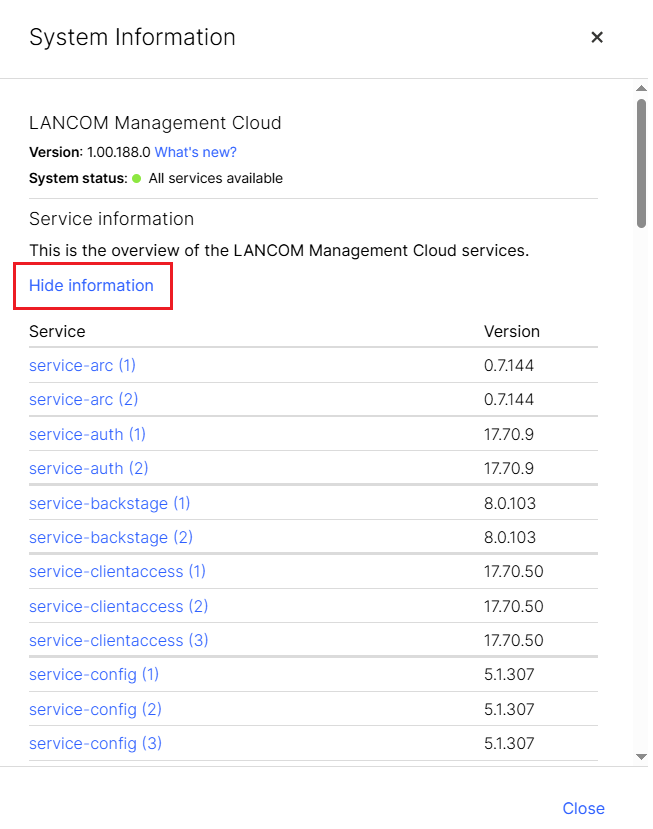
A list of all microservices can be found in the LMC System Information (click Show Information):
Swagger is not just a specification; it comes with a suite of open-source tools that facilitate the design, development, documentation, and usage of RESTful web services.
Key features include automated documentation generation, code generation in multiple programming languages, and test-case generation.
Swagger Code Generator
Swagger provides a Java JAR to generate code from a given API specification (index-json).
Java Client
The following bash script generates a java client.
#!/bin/bash

# usage:
# command <index.json> <output-dir>

java -Dapis -Dmodels -DsupportingFiles -Dmodels -jar swagger-codegen-cli.jar \
        generate -l java \
        --library resttemplate \
        --additional-properties java8=true \
        --api-package de.lcs.lmc.api \
        --model-package de.lcs.lmc.dto \
        --group-id de.lcs.lmc \
        --artifact-id de.lcs.lmc.$(basename $1 .json) \
        --artifact-version v1.0 \
        -DdateLibrary=other \
        -i $1 -o "$2/"
