
Description:
This document describes how to configure LANCOM cellular routers for budget monitoring of data volumes for mobile WAN connections.
Requirements:
Requirements:
- LCOS as of version 8.84 (download latest version)
- LCMS version 8.84 (download latest version)
- LANCOM mobile communication router (e.g. LANCOM 1790-4G+)
Procedure:
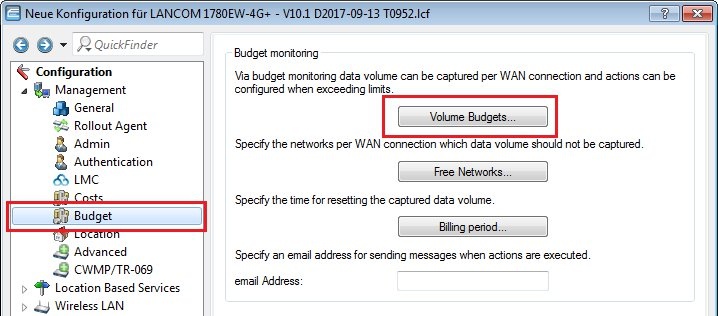
1) In LANconfig, open the configuration dialog for the LANCOM router and switch to the menu item Configuration → Management → Budget.
2) Now click on the Volume budgets button.
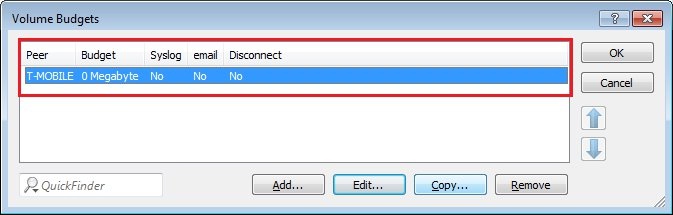
3) Select the applicable mobile peer for volume-budget monitoring and click Edit.
4) In the field Budget, you specify the data volume (in megabytes) which, once exceeded, causes one or more actions to be initiated.
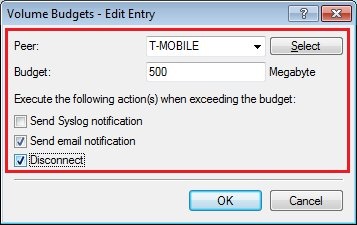
5) In this example, the mobile connection will be disconnected and a notification sent by e-mail.
6) Confirm your entries with OK and write the configuration back to the LANCOM router.
- When the specified data volume is exceeded, the mobile connection is disconnected and will only be reconnected when the next billing period begins. The steps to configure a mobile backup connection that automatically reconnects is described in this Knowledge Base article.
- The budget monitoring and thus the automatic disconnection of the mobile connection does not work if no so-called KeepAlive with a hold-short time of 9999 seconds is set up in the configuration of the mobile connection.
