
Description:
This article describes Best Practice recommendations for redundant scenarios with LANCOM switches.
Link Aggregation:
If high amounts of data have to be transmitted, it can happen that the transfer rate of one port is not enough. With Link Aggregation it is possible to bundle serveral ports and thus the transfer rate is increased significantly.
Configuring LACP on LANCOM switches:
- Configuring an LACP trunk between a LANCOM GS-23xx series switch and a LANCOM router or access point
- Configuring an LACP Trunk on a GS-3xxx series switch
- Configuring an LACP Trunk on a GS-24xx / GS-3xxx / XS-3xxx series switch (LCOS SX 4.20 / 4.30)
- Configuring an LACP Trunk on a switch with LCOS SX 5.xx
Information and recommendations:
- Link Aggregation is activated on ports, where high amounts of data have to be transmitted (e.g. an uplink to another switch or to a server).
- In contrast to a Static Trunk the feature LACP supports a dynamic negotiation, thus enabling the Trunk to remain active when a line fails. LANCOM Systems therefore recommends to always use LACP when combining switch ports to a trunk.
- The ports used for Link Aggregation must have the same speed (e.g. two ports with 10 GBit/Sec.).
- VLAN settings must be the same on all aggregation ports so data can be transmitted.
Interoperability to other features on the same port:
- Link Aggregation + Spanning Tree → Possible and practical.
- Link Aggregation + Stacking → Not possible on the Stack port; however, possible and practical when using Stacking to use Link Aggregation to connect additional devices like access points and servers
- Link Aggregation + Loop Protection → Possible and practical.
NIC teaming with a Windows Server:
The feature NIC teaming enables Link Aggregation to be configured between a switch and a Windows Server.
Configuring NIC Teaming between a LANCOM managed switch and a Microsoft Windows server:
Information and recommendations:
- NIC teaming / Link Aggregation is activated on ports, where high amounts of data have to be transmitted (to a Windows Server).
- When a managed switch is used, LANCOM Systems recommends to always use the mode LACP.
- The mode Switch Independent on the Windows server should only be used with an unmanaged Switch.
Interoperability to other features on the same port:
- NIC Teaming / Link Aggregation + Spanning Tree → Possible and practical.
- NIC Teaming / Link Aggregation + Stacking → Possible and practical.
- NIC Teaming / Link Aggregation + Loop Protection → Possible, but impractical, as a server is usually an endpoint and therefore a loop is highly unlikely.
Spanning Tree:
A redundant network connection also requires redundant cabling. Without additional measures this would lead to a loop and would therefore cripple the whole network. With Spanning Tree all but the shortest path are set inactive and therefore a loop is prevented. When an outage of the active path occurs, a change to another path takes place and therefore network communication is restored.
Configuring Spanning Tree on LANCOM switches:
- Configuring RSTP on a GS-23xx series switch
- Configuring RSTP on a GS-3xxx series switch (LCOS SX 4.00)
- Configuring RSTP on a GS-24xx / GS-3xxx / XS-3xxx series switch (LCOS SX as of version 4.30)
- Configuring RSTP on a switch with LCOS SX 5.xx
Information and recommendations:
- Spanning Tree is always configured on ports to other network devices (e.g. a router or a switch).
- On ports where end devices are connected, Spanning Tree should be deactivated and Loop Protection should be activated instead.
- STP is deprecated and should not be used anymore.
- In most scenarios it makes sense to use RSTP. There is one instance for the whole network. In contrast to STP topology changes happen much faster with RSTP , thus minimizing downtimes.
- In some scenarios it can be useful to use MSTP. It is used for a VLAN group (a group with only one VLAN is also possible) and forms an instance for each group.
- On GS-23xx and GS-24xx / GS-3xxx / XS-3xxx switches Spanning Tree has to be activated separately for Link Aggregation:
- GS-23xx:
In the menu Configuration → Spanning Tree → CIST Ports the option STP Enabled has to be activated under CIST Aggregated Port Configuration.
- GS-23xx:

- GS-3xxx with LCOS SX 4.00:
In the menu Spanning Tree → MSTI Configuration the instance CIST has to be edited under the MSTI Mapping. Afterwards make sure that the option STP Enabled under CIST Aggregated Port Configuration is active (default setting).
- GS-3xxx with LCOS SX 4.00:
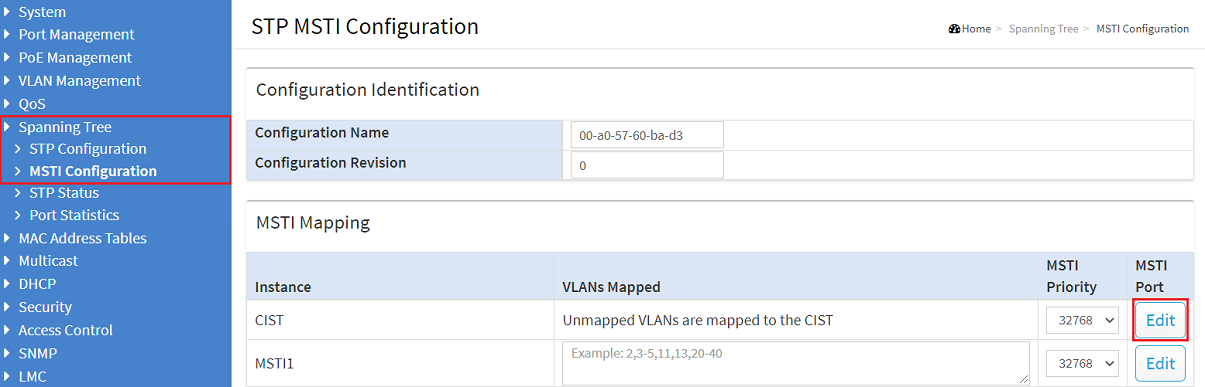

- GS-24xx / GS-3xxx / XS-3xxx with LCOS SX as of version 4.30:
In the menu Spanning Tree → CIST Ports the option STP Enabled must be active under CIST Aggregated Port Configuration (default setting).
- GS-24xx / GS-3xxx / XS-3xxx with LCOS SX as of version 4.30:

Interoperability to other features on the same port:
- Spanning Tree + Link Aggregation → Possible and practical.
- Spanning Tree + Stacking → Possible, but impractical on the Stack port, as path monitoring is already included in Stacking; however, possible and practical to activate Spanning Tree on other switch ports
- Spanning Tree + Loop Protection → Possible, but impractical, as both features deactivate ports. Can lead to network problems.
Stacking (XS-51xx / XS-61xx and GS-45xx series only):
Stacking is used for connecting several switches with each other. They form a logical unit and are managed via the Stack Master / Manager. As the XS-51xx / XS-61xx series switches feature a dedicated Stacking backplane, the switching backplane is not additionally strained with the Stacking traffic.
Configuring stacking on an XS-51xx / XS-61xx or GS-45xx series switch:
Information and recommendations:
- Stacking is configured on dedicated Stacking ports to connect the switches with each other.
- Stacking can also be configured via the LANCOM Management Cloud (LMC) if LCOS SX as of version 5.20 is used on the switches.
Interoperability to other features on the same port:
- Stacking + Spanning Tree → Possible, but impractical on the Stack port, as path monitoring is already included in Stacking; however, possible and practical to activate Spanning Tree on other switch ports
- Stacking + Link Aggregation → Not possible on the Stack port; however, possible and practical when using Stacking to use Link Aggregation to connect additional devices like access points and servers
- Stacking + Loop Protection → Possible, but impractical, as a loop is already prevented by Stacking.
